SQL Transactions & Concurrency: Master ACID, COMMIT/ROLLBACK, Isolation Levels, Locking, Deadlocks with Examples & Best Practices
Table of Contents
- 1. What is a transaction in SQL?
- 2. What are the ACID properties of a transaction?
- 3. Example: Transaction with ACID Properties
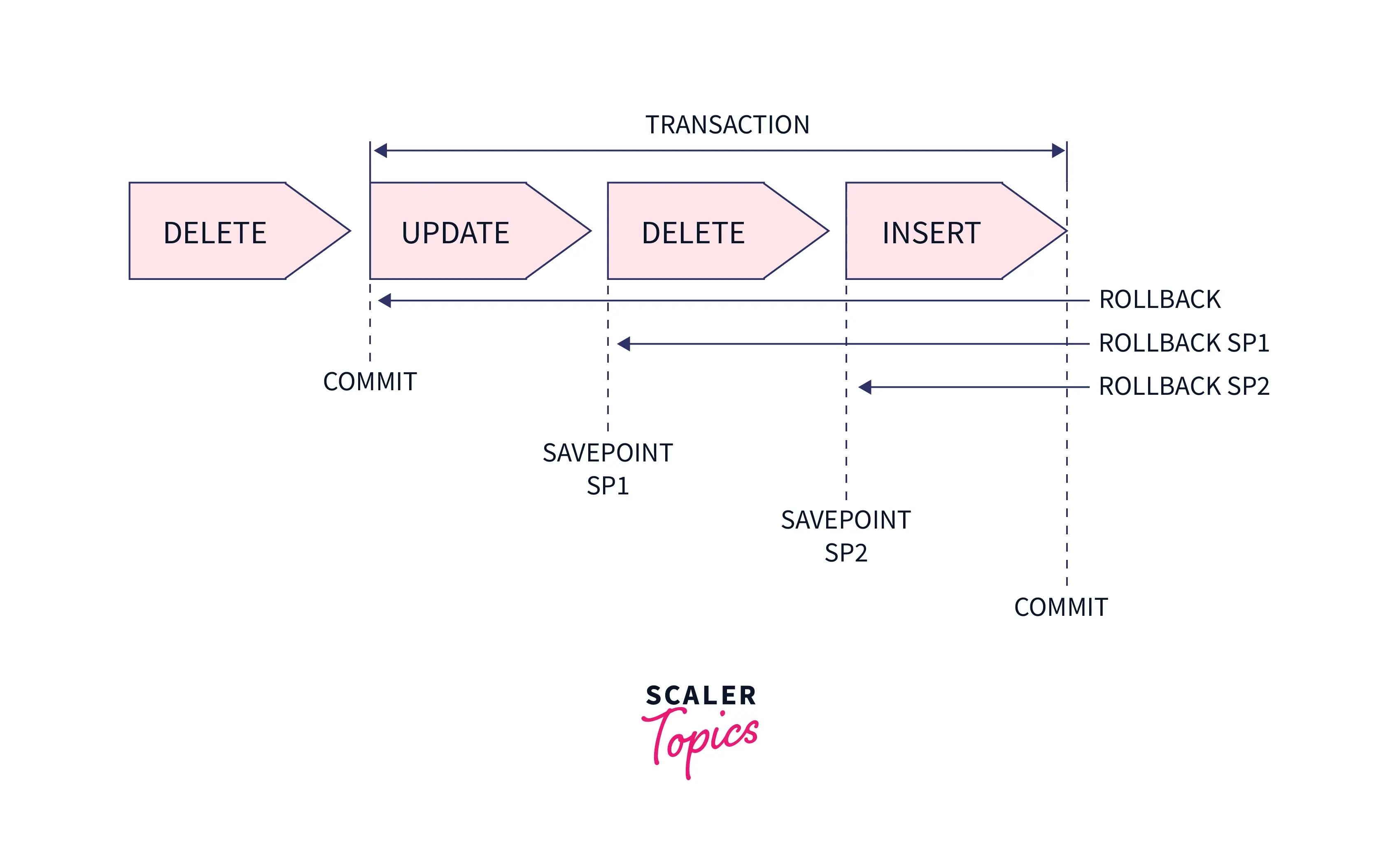
- 4. What are COMMIT and ROLLBACK?
- 5. Example: COMMIT and ROLLBACK
- 6. What are isolation levels in SQL?
- 7. Example: Isolation Levels
- 8. What is locking in databases?
- 9. Example: Locking
- 10. What is a deadlock in databases?
- 11. Example: Deadlock Scenario
- 12. Comprehensive Example
- 13. Common Mistakes
- 14. Best Practices
1. What is a transaction in SQL?
A transaction is a sequence of SQL operations (e.g., INSERT, UPDATE, DELETE) treated as a single unit of work that must succeed or fail entirely. Transactions ensure data consistency and integrity in a database.
Syntax:
BEGIN TRANSACTION;
-- SQL statements
COMMIT;
-- or ROLLBACK;
Supported across RDBMS (MySQL, PostgreSQL, SQL Server, SQLite), with variations (e.g., START TRANSACTION in MySQL).
2. What are the ACID properties of a transaction?
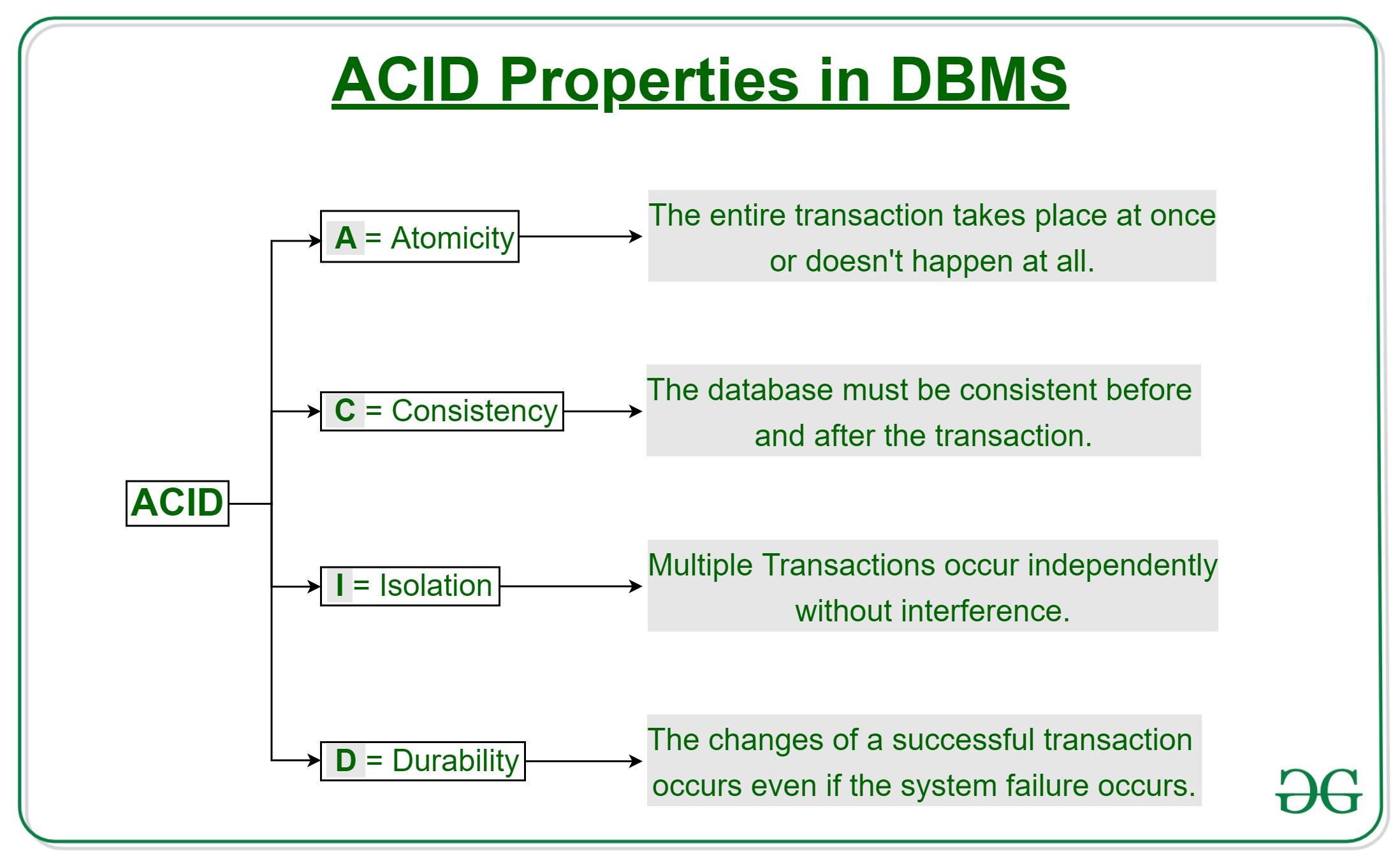
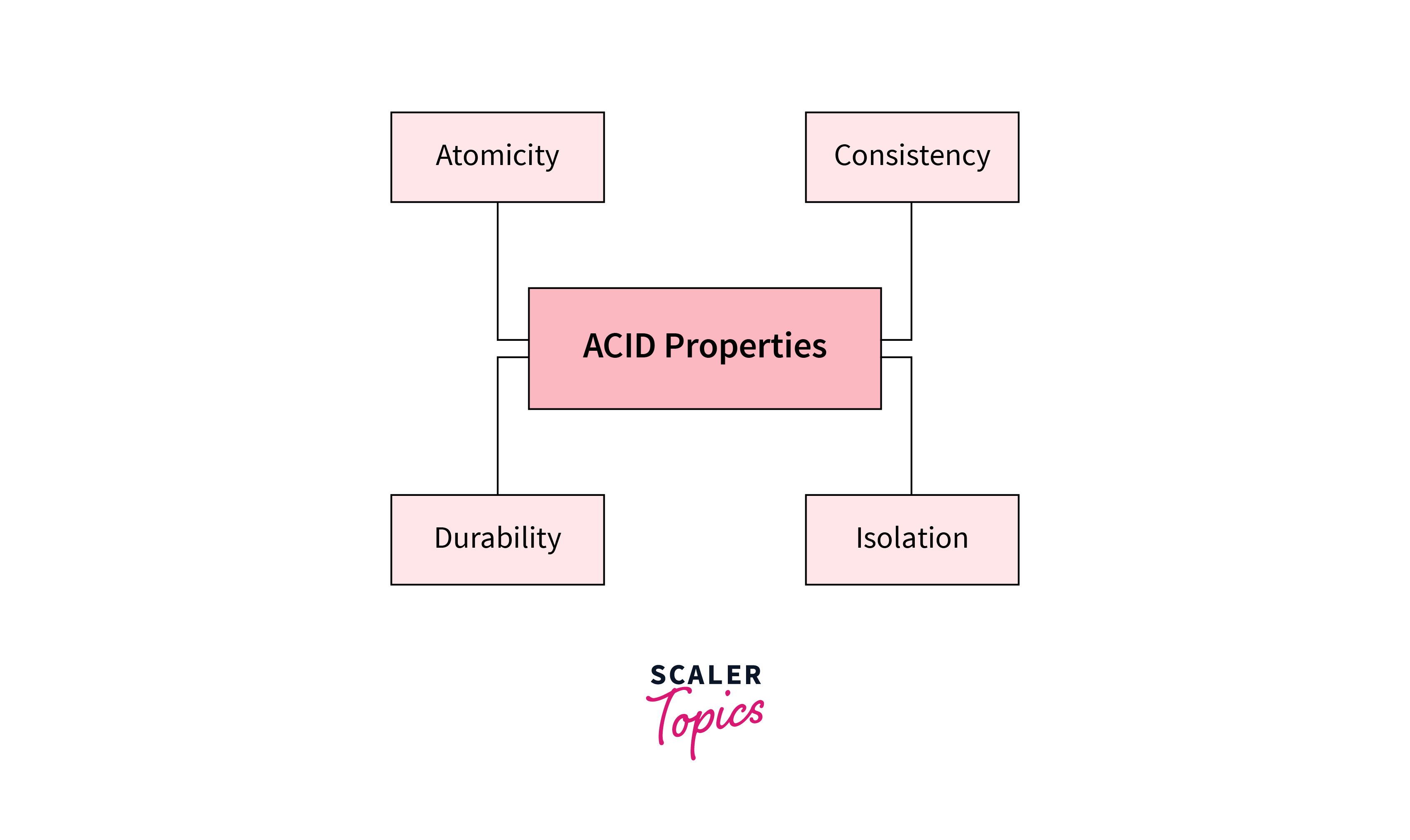
ACID ensures reliable transactions:
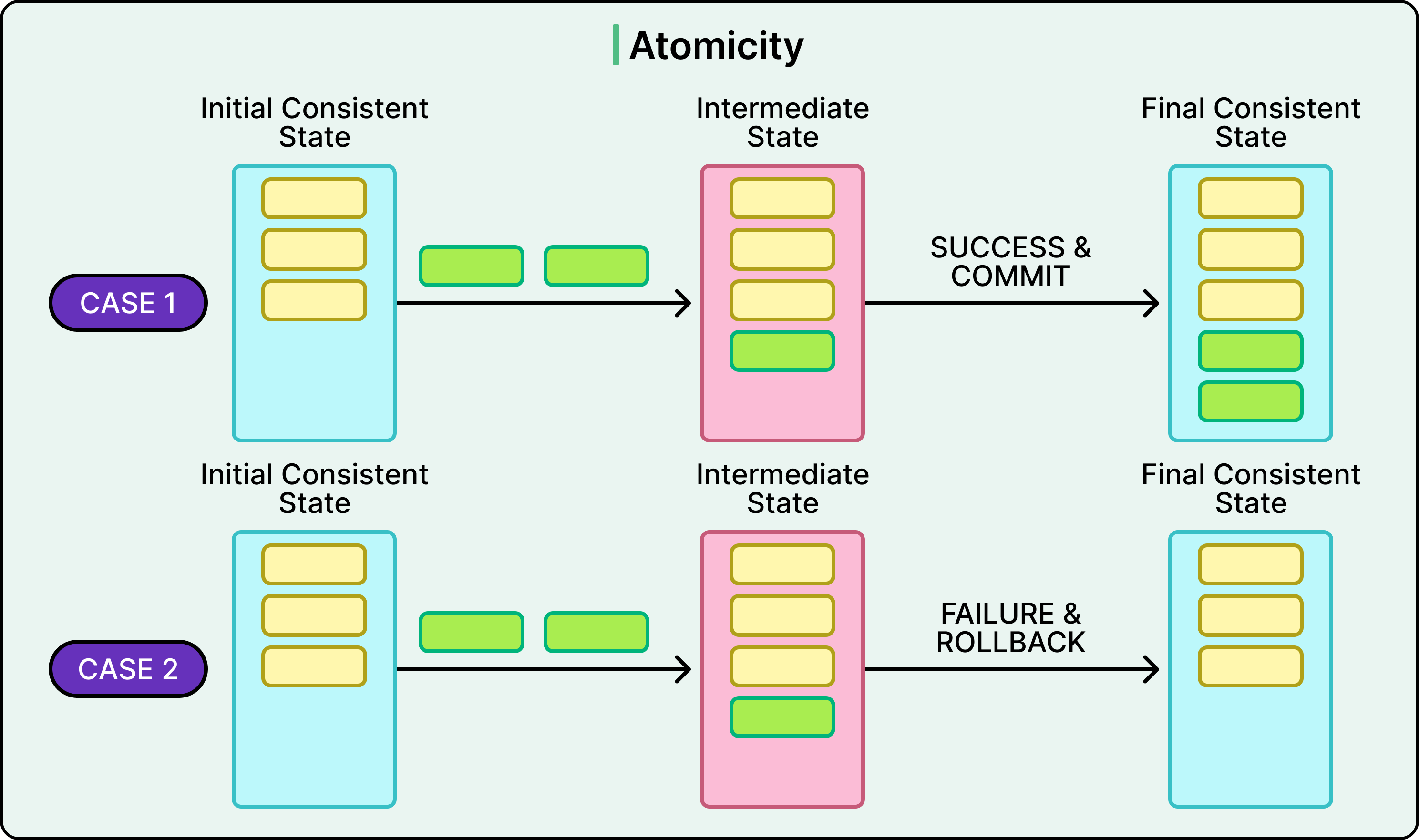
- Atomicity: Ensures all operations in a transaction complete successfully, or none are applied (all or nothing).
- Consistency: Guarantees the database remains in a valid state before and after the transaction, respecting constraints (e.g., primary keys, foreign keys).
- Isolation: Ensures transactions are executed independently; partial changes from one transaction are not visible to others until committed.
- Durability: Guarantees committed transactions are permanently saved, even in case of system failure.
3. Can you give an example of a transaction with ACID properties?
-- Create sample tables
CREATE TABLE Accounts (
  AccountID INT PRIMARY KEY,
  AccountHolder VARCHAR(50),
  Balance DECIMAL(10, 2)
);
-- Insert sample data
INSERT INTO Accounts (AccountID, AccountHolder, Balance)
VALUES (1, 'John', 1000.00), (2, 'Jane', 500.00);

-- Transaction: Transfer $200 from John to Jane
BEGIN TRANSACTION;
UPDATE Accounts SET Balance = Balance - 200.00 WHERE AccountID = 1;
UPDATE Accounts SET Balance = Balance + 200.00 WHERE AccountID = 2;
-- Check if John has enough balance
IF (SELECT Balance FROM Accounts WHERE AccountID = 1) >= 0
  COMMIT;
ELSE
  ROLLBACK;

-- Verify data
SELECT * FROM Accounts;
Output:
AccountID | AccountHolder | Balance
----------|--------------|--------
1         | John         | 800.00
2         | Jane         | 700.00
Note:
- Atomicity: Both
UPDATEstatements succeed, or neither is applied. - Consistency: The total balance (1500.00) remains unchanged.
- Isolation: Other transactions don't see partial updates.
- Durability: The committed transfer is saved permanently.
4. What are COMMIT and ROLLBACK?
COMMIT: Permanently saves all changes made in the transaction to the database.
ROLLBACK: Undoes all changes made in the transaction, restoring the database to its state before the transaction began.
Syntax:
BEGIN TRANSACTION;
-- SQL statements
COMMIT; -- Save changes
-- or
ROLLBACK; -- Undo changes
Use Case: Use COMMIT for successful operations; use ROLLBACK for errors or invalid states (e.g., insufficient balance in a transfer).
5. Can you give an example of COMMIT and ROLLBACK?
-- Transaction with error handling
BEGIN TRANSACTION;
UPDATE Accounts SET Balance = Balance - 1000.00 WHERE AccountID = 1;
-- Simulate an error: insufficient balance
IF (SELECT Balance FROM Accounts WHERE AccountID = 1) < 0
BEGIN
  ROLLBACK;
  SELECT 'Transaction rolled back: Insufficient balance' AS Message;
END
ELSE
BEGIN
  UPDATE Accounts SET Balance = Balance + 1000.00 WHERE AccountID = 2;
  COMMIT;
  SELECT 'Transaction committed' AS Message;
END;

-- Verify data
SELECT * FROM Accounts;
Output:
Message
--------------------------------
Transaction rolled back: Insufficient balance

AccountID | AccountHolder | Balance
----------|--------------|--------
1         | John         | 800.00
2         | Jane         | 700.00
Note: The transaction rolls back because John's balance (800.00) is insufficient for a 1000.00 transfer, preserving the original state.
6. What are isolation levels in SQL?

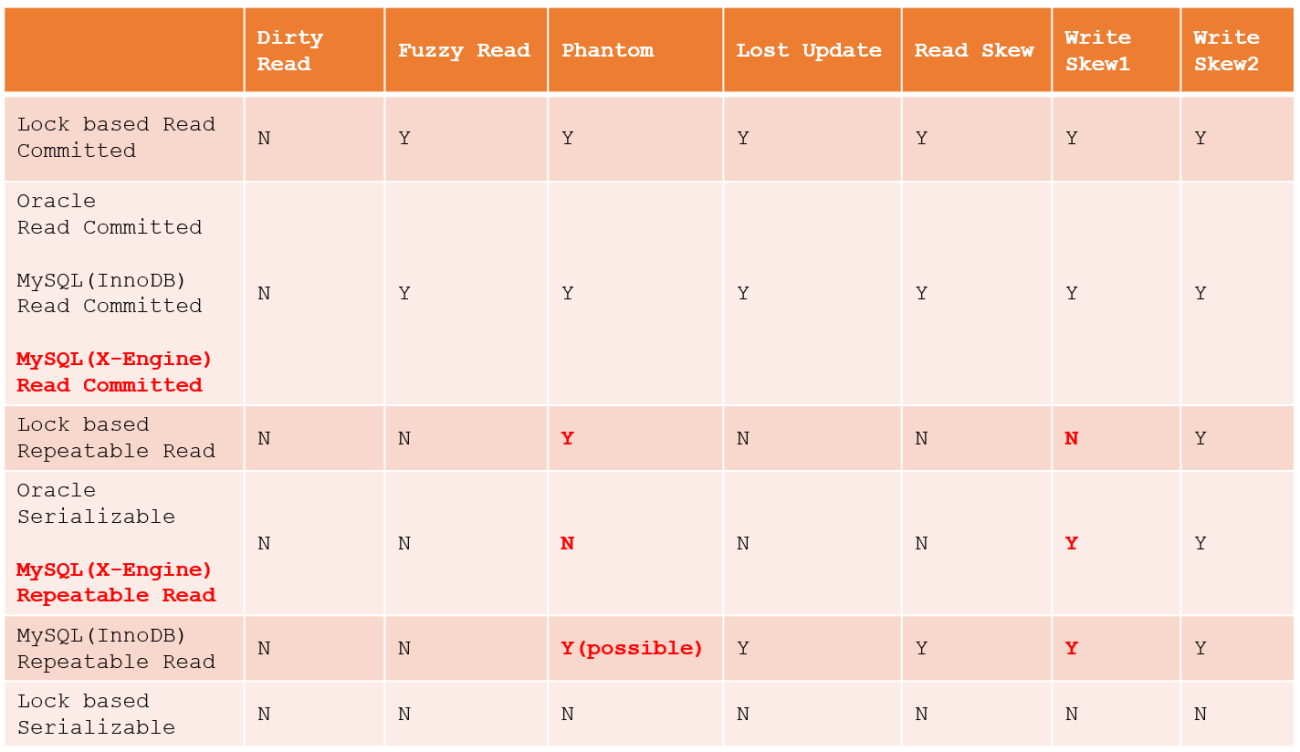
Isolation levels define how transactions are isolated from each other, balancing data consistency with performance. They control the visibility of uncommitted changes and prevent concurrency issues (e.g., dirty reads, non-repeatable reads, phantoms).
Standard Isolation Levels (SQL Standard):
- Read Uncommitted: Allows reading uncommitted changes (dirty reads). Lowest isolation, highest concurrency.
- Read Committed: Prevents dirty reads; only committed data is read. May allow non-repeatable reads and phantoms.
- Repeatable Read: Prevents dirty reads and non-repeatable reads (same data read consistently within a transaction). May allow phantoms.
- Serializable: Highest isolation; prevents dirty reads, non-repeatable reads, and phantoms by ensuring complete transaction isolation. Lowest concurrency.
Syntax (varies by RDBMS):
SET TRANSACTION ISOLATION LEVEL READ COMMITTED;
BEGIN TRANSACTION;
-- SQL statements
COMMIT;
Support: MySQL, PostgreSQL, SQL Server support all levels; SQLite supports SERIALIZABLE and READ UNCOMMITTED.
7. Can you give an example of isolation levels?
-- Set isolation level to Read Committed
SET TRANSACTION ISOLATION LEVEL READ COMMITTED;
BEGIN TRANSACTION;
SELECT Balance FROM Accounts WHERE AccountID = 1;
-- Assume another session updates Balance but doesn't commit
-- This transaction sees only committed data
COMMIT;

-- Verify data
SELECT * FROM Accounts;
Output:
AccountID | AccountHolder | Balance
----------|--------------|--------
1         | John         | 800.00
2         | Jane         | 700.00
Note: In READ COMMITTED, the transaction sees only committed changes, preventing dirty reads from concurrent updates.
8. What is locking in databases?
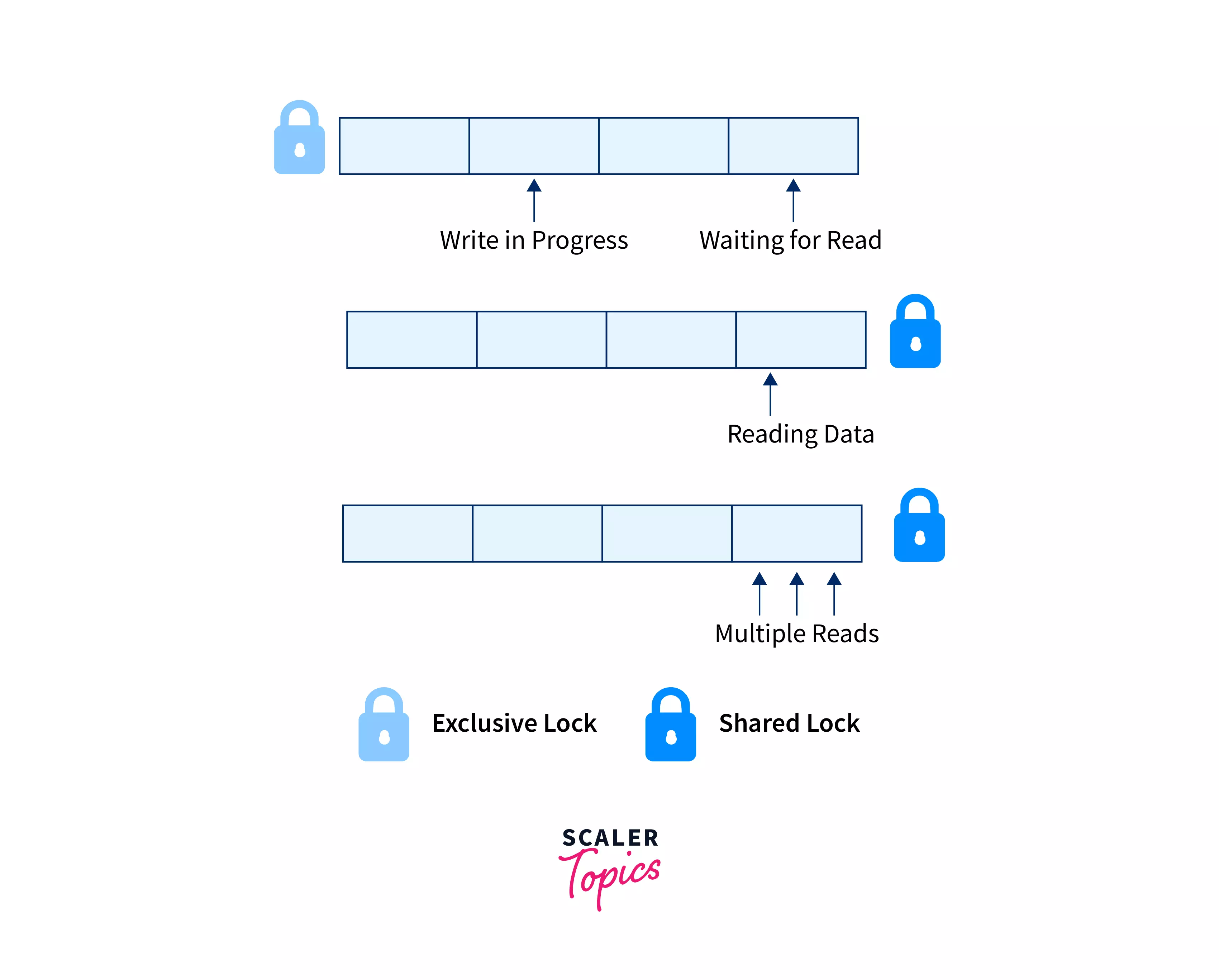
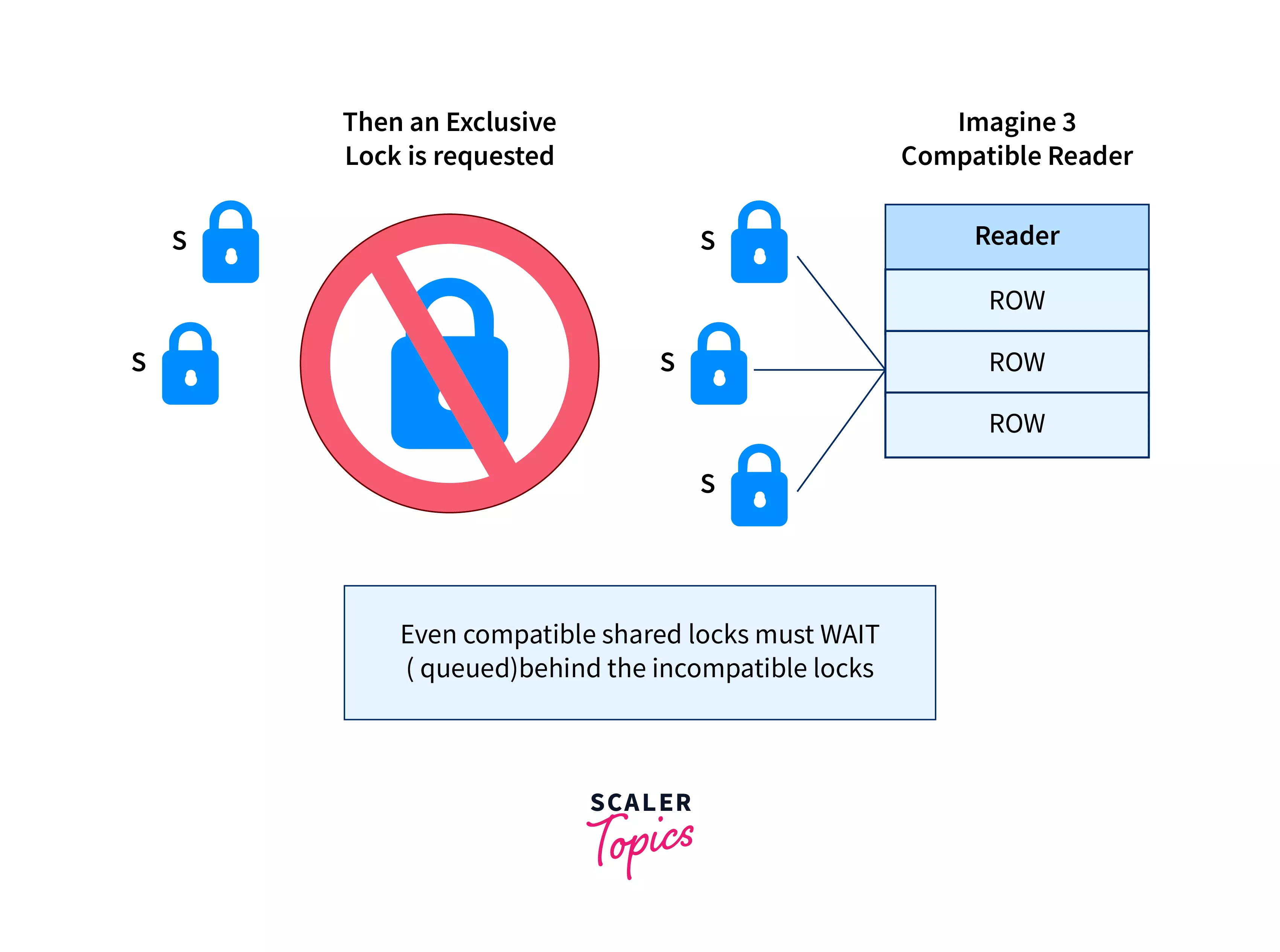
Locking is a mechanism to control concurrent access to data, preventing conflicts when multiple transactions access the same resources.
Types of Locks:
- Shared Lock (S): Allows multiple transactions to read data but not modify it (used in
SELECT). - Exclusive Lock (X): Allows one transaction to modify data, blocking others from reading or writing (used in
UPDATE,DELETE). - Row-Level Lock: Locks specific rows.
- Table-Level Lock: Locks an entire table.
Syntax (varies by RDBMS):
-- Explicit locking (SQL Server)
SELECT * FROM Accounts WITH (ROWLOCK, UPDLOCK);
-- Implicit locking occurs during DML operations
9. Can you give an example of locking?
-- Transaction with explicit locking (SQL Server syntax)
BEGIN TRANSACTION;
SELECT Balance FROM Accounts WITH (UPDLOCK) WHERE AccountID = 1;
-- Update balance (exclusive lock acquired)
UPDATE Accounts SET Balance = Balance - 100.00 WHERE AccountID = 1;
COMMIT;

-- Verify data
SELECT * FROM Accounts;
Output:
AccountID | AccountHolder | Balance
----------|--------------|--------
1         | John         | 700.00
2         | Jane         | 700.00
Note: UPDLOCK ensures no other transaction modifies the row until the transaction commits, preventing conflicts.
10. What is a deadlock in databases?
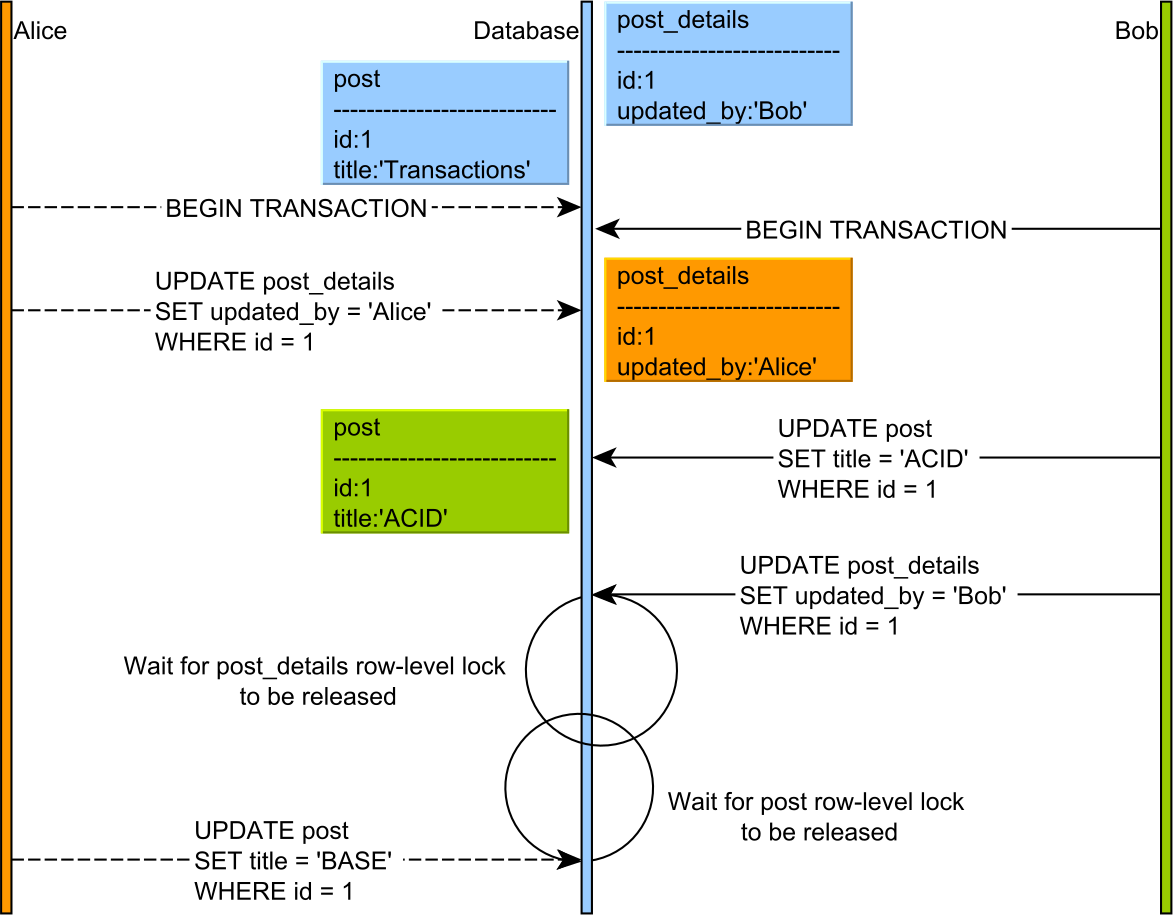
A deadlock occurs when two or more transactions wait indefinitely for each other to release locks, creating a cycle.
Example: Transaction A locks Row 1 and waits for Row 2; Transaction B locks Row 2 and waits for Row 1.
Resolution: RDBMS detects deadlocks and terminates one transaction, rolling it back.
Prevention: Minimize lock duration, access resources in a consistent order, use appropriate isolation levels.
11. Can you give an example of a deadlock scenario?

-- Session 1
BEGIN TRANSACTION;
UPDATE Accounts SET Balance = Balance - 100.00 WHERE AccountID = 1;
-- Waits for AccountID 2
UPDATE Accounts SET Balance = Balance + 100.00 WHERE AccountID = 2;
COMMIT;

-- Session 2 (run concurrently)
BEGIN TRANSACTION;
UPDATE Accounts SET Balance = Balance - 50.00 WHERE AccountID = 2;
-- Waits for AccountID 1
UPDATE Accounts SET Balance = Balance + 50.00 WHERE AccountID = 1;
COMMIT;
Note:
- Session 1 locks
AccountID=1and waits forAccountID=2. - Session 2 locks
AccountID=2and waits forAccountID=1. - The RDBMS detects the deadlock, rolls back one transaction (e.g., Session 2), and allows the other to proceed.
- Output: Varies; one transaction completes, the other raises a deadlock error.
12. Can you provide a comprehensive example using transactions, ACID, isolation levels, locking, and deadlock handling?
-- Create sample table
CREATE TABLE Accounts (
  AccountID INT PRIMARY KEY,
  AccountHolder VARCHAR(50),
  Balance DECIMAL(10, 2)
);
-- Insert sample data
INSERT INTO Accounts (AccountID, AccountHolder, Balance)
VALUES (1, 'John', 1000.00), (2, 'Jane', 500.00);

-- Transaction with isolation level and locking
SET TRANSACTION ISOLATION LEVEL REPEATABLE READ;
BEGIN TRANSACTION;
-- Lock row for update
SELECT Balance FROM Accounts WITH (UPDLOCK) WHERE AccountID = 1;
-- Transfer $200 from John to Jane
UPDATE Accounts SET Balance = Balance - 200.00 WHERE AccountID = 1;
-- Check balance to ensure validity
IF (SELECT Balance FROM Accounts WHERE AccountID = 1) < 0
BEGIN
  ROLLBACK;
  SELECT 'Transaction rolled back: Insufficient balance' AS Message;
END
ELSE
BEGIN
  UPDATE Accounts SET Balance = Balance + 200.00 WHERE AccountID = 2;
  COMMIT;
  SELECT 'Transaction committed' AS Message;
END;

-- Verify data
SELECT * FROM Accounts;
Output:
Message
--------------------
Transaction committed

AccountID | AccountHolder | Balance
----------|--------------|--------
1         | John         | 800.00
2         | Jane         | 700.00
Description:
- ACID: Ensures atomic transfer, consistent balances, isolated execution, and durable changes.
- Isolation Level:
REPEATABLE READprevents non-repeatable reads. - Locking:
UPDLOCKensures exclusive access toAccountID=1. - COMMIT/ROLLBACK: Commits if valid, rolls back if insufficient balance.
- Deadlock Prevention: Accesses accounts in a consistent order (
AccountID1 then 2). - Integrates prior concepts (
SELECT,UPDATE,WHERE).
13. What are common mistakes in transactions and concurrency?
Transactions:
- Forgetting
COMMITorROLLBACK, leaving transactions open and locking resources. - Including too many operations in a transaction, increasing lock duration.
- Ignoring constraint violations (e.g., foreign keys), causing transaction failures.
Isolation Levels:
- Using overly strict levels (e.g.,
SERIALIZABLE) unnecessarily, reducing concurrency. - Allowing
READ UNCOMMITTED, risking dirty reads in critical applications.
Locking:
- Overusing table-level locks, blocking concurrent access.
- Not releasing locks promptly, increasing deadlock risk.
Deadlocks:
- Accessing resources in inconsistent order, causing deadlocks.
- Ignoring deadlock errors, leading to unhandled transaction failures.
14. What are best practices for transactions and concurrency?
Transactions:
- Keep transactions short to minimize lock duration.
- Always include
COMMITorROLLBACKexplicitly. - Validate data (e.g., check balances) before modifying.
Isolation Levels:
- Use
READ COMMITTEDfor most applications to balance consistency and concurrency. - Use
REPEATABLE READorSERIALIZABLEfor strict consistency needs (e.g., financial systems). - Test isolation levels with concurrent transactions to ensure correct behavior.
Locking:
- Prefer row-level locks over table-level locks for better concurrency.
- Use explicit locks (e.g.,
UPDLOCK) only when necessary to avoid conflicts. - Index columns used in
WHEREorJOINto reduce lock scope.
Deadlocks:
- Access resources in a consistent order (e.g., always lock accounts by
AccountIDascending). - Handle deadlock errors with retry logic in application code.
- Monitor deadlocks using RDBMS tools (e.g., SQL Server Profiler, PostgreSQL logs).
General:
- Comment transactions for clarity (e.g.,
-- Transfer funds between accounts). - Use
EXPLAINorEXPLAIN ANALYZEto optimize queries within transactions. - Test concurrent scenarios to verify isolation and locking behavior.
- Backup data before critical transactions to allow recovery.