SQL GROUP BY Clause: Master Aggregation with HAVING, GROUPING SETS, ROLLUP & Comprehensive Examples
Table of Contents
1. Using GROUP BY
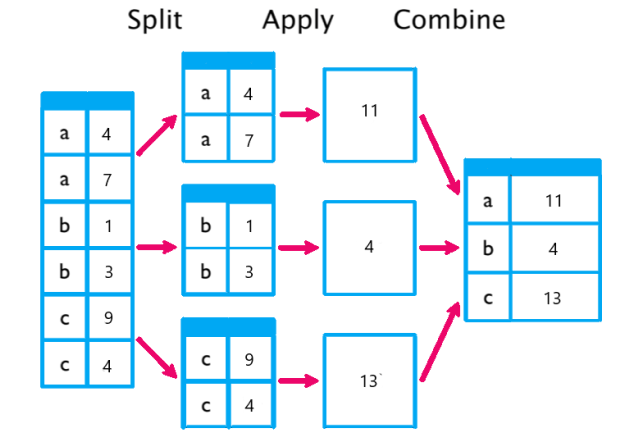
Q: What is the GROUP BY clause in SQL?
The GROUP BY clause groups rows with identical values in specified columns into summary rows, typically used with aggregate functions (COUNT, SUM, AVG, etc.) to compute statistics for each group.
Syntax:
SELECT column1, aggregate_function(column2) FROM table_name GROUP BY column1;
- Groups rows based on non-aggregated columns in the
SELECTclause. - Aggregate functions summarize data within each group.
Q: Why is GROUP BY important?
- Enables data summarization (e.g., total sales by region, average salary by department).
- Supports analytical queries for reporting and business intelligence.
- Works with
HAVINGto filter groups andORDER BYto sort results.
Q: Can you give an example of GROUP BY with aggregate functions?
-- Create sample table
CREATE TABLE Employees ( EmployeeID INT PRIMARY KEY, FirstName VARCHAR(50), LastName VARCHAR(50), Department VARCHAR(50), Salary DECIMAL(10, 2), Email VARCHAR(100)
);
-- Insert sample data
INSERT INTO Employees (EmployeeID, FirstName, LastName, Department, Salary, Email)
VALUES (1, 'John', 'Doe', 'IT', 60000.00, '[email protected]'), (2, 'Jane', 'sahil', 'HR', 55000.00, NULL), (3, 'kristal', 'Johnson', 'IT', 65000.00, '[email protected]'), (4, 'Ram', 'Williams', 'HR', 55000.00, NULL), (5, 'hari', 'Brown', 'Marketing', NULL, '[email protected]'), (6, 'Sashi', 'Sashi', 'IT', 62000.00, '[email protected]');
-- GROUP BY: Summarize employees by department
SELECT Department, COUNT(*) AS TotalEmployees, SUM(Salary) AS TotalSalary, AVG(Salary) AS AvgSalary
FROM Employees
GROUP BY Department;
Output:
Department | TotalEmployees | TotalSalary | AvgSalary
-----------|---------------|-------------|-----------
HR | 2 | 110000.00 | 55000.00
IT | 3 | 187000.00 | 62333.33
Marketing | 1 | NULL | NULL
Note:SUM and AVG ignore NULLs (e.g., hari's NULL salary), and COUNT(*) counts all rows.
2. Filtering Groups with HAVING

Q: What is the HAVING clause in SQL?
The HAVING clause filters groups created by GROUP BY based on conditions applied to aggregate results. It is similar to WHERE but applies after grouping, whereas WHERE filters individual rows before grouping.
Syntax:
SELECT column1, aggregate_function(column2) FROM table_name GROUP BY column1 HAVING condition;
Q: How does HAVING differ from WHERE?
WHERE:Filters individual rows before grouping (e.g.,WHERE Salary > 50000).HAVING:Filters groups after aggregation (e.g.,HAVING COUNT(*) > 2).- Order of Execution:
FROM→WHERE→GROUP BY→HAVING→SELECT→ORDER BY.
Q: Can you give an example of HAVING?
-- Filter departments with more than 1 employee and total salary > 100000
SELECT Department, COUNT(*) AS TotalEmployees, SUM(Salary) AS TotalSalary
FROM Employees
WHERE Salary IS NOT NULL
GROUP BY Department
HAVING COUNT(*) > 1 AND SUM(Salary) > 100000;
Output:
Department | TotalEmployees | TotalSalary
-----------|---------------|-------------
IT | 3 | 187000.00
Description:
WHERE Salary IS NOT NULLfilters out rows withNULLsalaries before grouping.GROUP BY Departmentgroups by department.HAVINGfilters groups with more than 1 employee and total salary over 100000.
3. Grouping Sets and Rollups
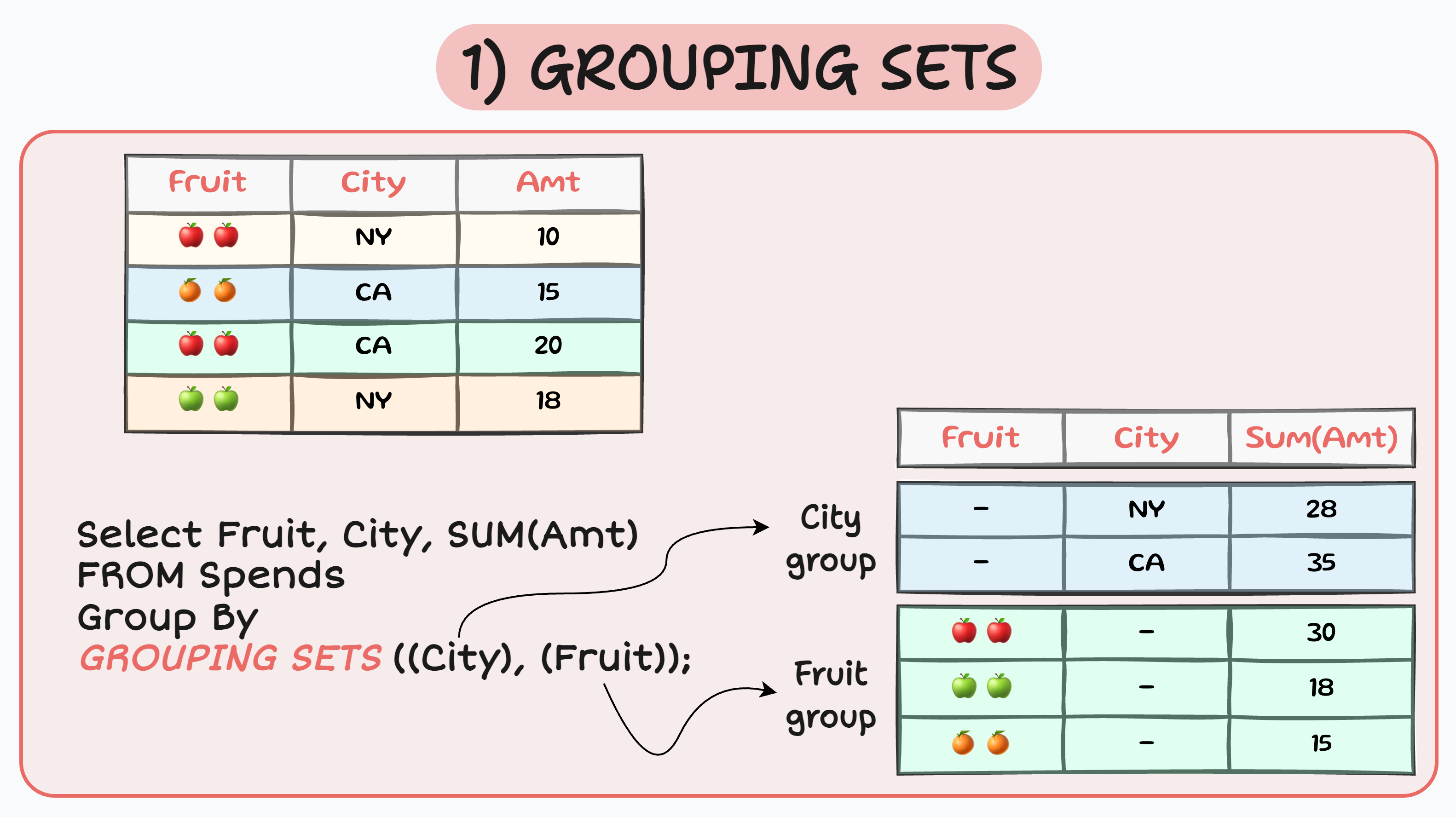
Q: What are GROUPING SETS and ROLLUP in SQL?
- GROUPING SETS: Allows multiple grouping combinations in a single query, producing results as if multiple
GROUP BYqueries were combined.- Syntax:
GROUP BY GROUPING SETS ((column1), (column2), ...) - Useful for generating subtotals or multiple levels of aggregation.
- Syntax:
- ROLLUP: A special case of
GROUPING SETSthat creates hierarchical subtotals, from the most detailed to the grand total.- Syntax:
GROUP BY ROLLUP (column1, column2, ...) - Generates groups for all combinations of columns, including subtotals and a grand total.
- Syntax:
- Support: Available in PostgreSQL, SQL Server, Oracle; MySQL has limited support (use
WITH ROLLUPin older versions); SQLite lacks native support.
Q: How do GROUPING SETS and ROLLUP work?
GROUPING SETS:Explicitly defines which column combinations to group by (e.g.,(Department), (Department, FirstName), ()for grand total).ROLLUP:Automatically generates groups for all levels of a hierarchy (e.g.,ROLLUP (Department, FirstName)groups by(Department, FirstName),(Department), and()).NULLs in the result indicate subtotal or grand total rows.
Q: Can you give an example of GROUPING SETS and ROLLUP?
-- GROUPING SETS: Summarize by Department, Department+FirstName, and grand total
SELECT Department, FirstName, COUNT(*) AS TotalEmployees, SUM(Salary) AS TotalSalary
FROM Employees
WHERE Salary IS NOT NULL
GROUP BY GROUPING SETS ((Department, FirstName), (Department), ())
ORDER BY Department NULLS LAST, FirstName NULLS LAST;
-- ROLLUP: Summarize by Department, FirstName hierarchy
SELECT Department, FirstName, COUNT(*) AS TotalEmployees, SUM(Salary) AS TotalSalary
FROM Employees
WHERE Salary IS NOT NULL
GROUP BY ROLLUP (Department, FirstName)
ORDER BY Department NULLS LAST, FirstName NULLS LAST;
Output (GROUPING SETS):
Department | FirstName | TotalEmployees | TotalSalary
-----------|-----------|---------------|-------------
HR | Ram | 1 | 55000.00
HR | Jane | 1 | 55000.00
IT | kristal | 1 | 65000.00
IT | Sashi | 1 | 62000.00
IT | John | 1 | 60000.00
HR | NULL | 2 | 110000.00
IT | NULL | 3 | 187000.00
NULL | NULL | 5 | 297000.00
Output (ROLLUP):
Department | FirstName | TotalEmployees | TotalSalary
-----------|-----------|---------------|-------------
HR | Ram | 1 | 55000.00
HR | Jane | 1 | 55000.00
HR | NULL | 2 | 110000.00
IT | kristal | 1 | 65000.00
IT | Sashi | 1 | 62000.00
IT | John | 1 | 60000.00
IT | NULL | 3 | 187000.00
NULL | NULL | 5 | 297000.00
Description:
GROUPING SETS:Groups by(Department, FirstName),(Department), and()(grand total).ROLLUP:Includes all levels of the hierarchy:(Department, FirstName),(Department),().NULLs inDepartmentorFirstNameindicate subtotals or grand totals.
4. Comprehensive Example Combining All Concepts
Q: Can you provide a comprehensive example using GROUP BY, HAVING, GROUPING SETS, ROLLUP, and prior concepts (WHERE, aggregate functions, scalar functions)?
-- Comprehensive query combining GROUP BY, HAVING, GROUPING SETS, and prior concepts
SELECT Department, UPPER(FirstName) AS UpperFirstName, COUNT(*) AS TotalEmployees, SUM(Salary) AS TotalSalary, AVG(COALESCE(Salary, 0)) AS AvgSalaryWithZeros, LENGTH(Email) AS EmailLength, NOW() AS QueryTime
FROM Employees
WHERE Department IN ('IT', 'HR') AND FirstName LIKE 'J%'
GROUP BY GROUPING SETS ((Department, FirstName, Email), (Department), ())
HAVING COUNT(*) >= 1
ORDER BY Department NULLS LAST, UpperFirstName NULLS LAST
LIMIT 5; -- MySQL/PostgreSQL/SQLite (use TOP 5 for SQL Server)
Description:
- Filters employees in IT/HR with names starting with 'J' (
WHERE,IN,LIKE). - Groups by
(Department, FirstName, Email),(Department), and()usingGROUPING SETS. - Uses aggregate functions (
COUNT,SUM,AVG), scalar functions (UPPER,LENGTH,NOW), andCOALESCEforNULLhandling. - Filters groups with
HAVING COUNT(*) >= 1. - Orders by
DepartmentandUpperFirstName, limits to 5 rows.
5. Common Mistakes and Best Practices
Q: What are common mistakes when using GROUP BY, HAVING, and GROUPING SETS/ROLLUP?
GROUP BY:
- Including non-aggregated columns in
SELECTwithoutGROUP BY, causing errors (e.g., in PostgreSQL). - Forgetting that
NULLs are treated as a single group. - Grouping by too many columns, slowing queries on large datasets.
HAVING:
- Using
HAVINGinstead ofWHEREfor row-level filtering, reducing performance. - Omitting
GROUP BYwhen usingHAVING, causing syntax errors. - Writing complex
HAVINGconditions that could be simplified withWHERE.
GROUPING SETS/ROLLUP:
- Misinterpreting
NULLs in results as missing data instead of subtotals/grand totals. - Using
GROUPING SETSorROLLUPin unsupported RDBMS (e.g., SQLite, older MySQL). - Overusing
ROLLUPfor large datasets, leading to performance issues.
Q: What are best practices for grouping and aggregation in SQL?
GROUP BY:
- Include only necessary columns in
GROUP BYto match non-aggregatedSELECTcolumns. - Use indexes on
GROUP BYcolumns to improve performance. - Combine with
WHEREto filter rows before grouping for efficiency.
HAVING:
- Use
HAVINGonly for filtering aggregated results; useWHEREfor row-level filters. - Keep
HAVINGconditions simple (e.g.,HAVING COUNT(*) > 1) and test for correctness. - Combine with aggregate functions like
COUNT,SUM, orAVG.
GROUPING SETS/ROLLUP:
- Use
GROUPING SETSfor flexible, explicit group combinations. - Use
ROLLUPfor hierarchical subtotals in reports (e.g., sales by region, then total). - Use
GROUPING()function (in SQL Server, Oracle, PostgreSQL) to identify subtotal rows (e.g.,GROUPING(Department) = 1for subtotals). - Limit use in large datasets; test with
EXPLAINto check performance.
General:
- Handle
NULLs explicitly withCOALESCEin aggregations (e.g.,AVG(COALESCE(Salary, 0))). - Comment queries for clarity (e.g.,
-- Summarize by department). - Use consistent formatting (e.g., align
GROUP BY,HAVINGclauses). - Test grouping queries on small datasets to verify results.
- Optimize with indexes on grouped or filtered columns.