Big Data SQL on Hadoop: Apache Hive, Spark SQL, HiveQL & PySpark Comprehensive Examples
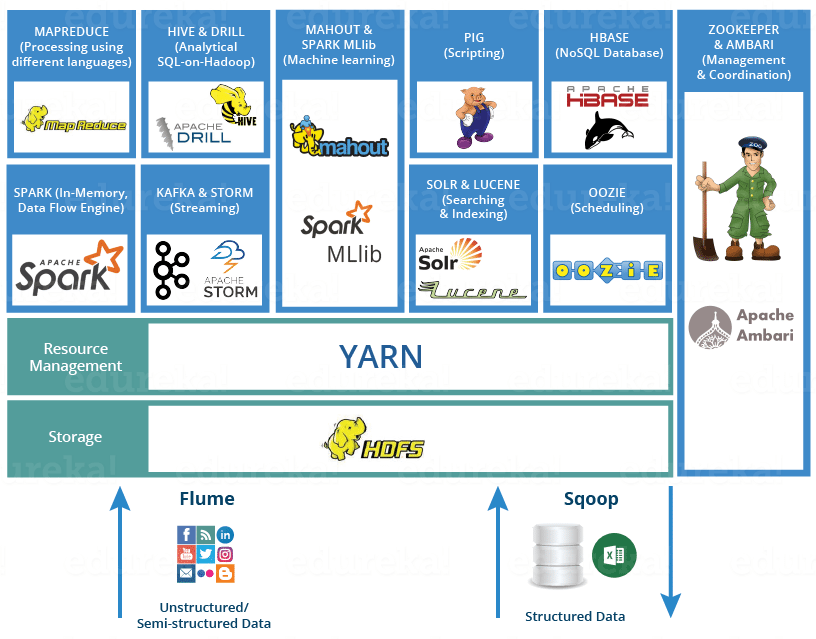


Table of Contents
1. What is big data, and how does SQL on Hadoop work?
Big Data: Refers to datasets too large or complex for traditional databases to handle efficiently, characterized by the 3Vs (Volume, Velocity, Variety). It requires distributed systems for storage and processing.
SQL on Hadoop: Extends SQL-like querying to big data platforms like Hadoop, enabling familiar SQL syntax for distributed data processing. Tools like Hive and Spark SQL translate SQL queries into distributed computations on Hadoop’s HDFS (Hadoop Distributed File System) or other storage systems.
Key Components:
- Hadoop: Distributed framework with HDFS for storage and MapReduce/YARN for processing.
- Hive: Provides a SQL-like interface (HiveQL) for querying data stored in HDFS, translating queries into MapReduce or Tez jobs.
- Spark SQL: Part of Apache Spark, offers a SQL interface for in-memory, distributed data processing, outperforming Hive for many workloads.
Use Case: Analyzing petabytes of log data, running reports on large-scale transactional data, or processing semi-structured data (e.g., JSON).
Support: Hive and Spark SQL work with Hadoop ecosystems; also compatible with cloud storage (e.g., AWS S3, Azure Data Lake).
2. What is Apache Hive, and what are its basics?
Apache Hive is a data warehouse system built on Hadoop, providing a SQL-like query language (HiveQL) to process and analyze large datasets stored in HDFS or compatible systems (e.g., S3). It abstracts complex MapReduce jobs into familiar SQL queries.
Key Features:
- HiveQL: SQL-like syntax for querying structured data.
- Schema on Read: Applies schema during query execution, not data loading.
- Partitioning and Bucketing: Improves query performance by organizing data.
- Metastore: Stores table metadata (e.g., schema, location).
- Engines: Supports MapReduce, Tez, or Spark for execution.
Use Case: Batch processing for large-scale analytics (e.g., daily sales reports).
Limitations: High latency (not real-time), not suited for OLTP (Online Transaction Processing).
3. Can you give an example of Hive basics?
-- Create a database
CREATE DATABASE IF NOT EXISTS company_db; -- Use the database
USE company_db; -- Create an external table (data stored in HDFS)
CREATE EXTERNAL TABLE Employees ( EmployeeID INT, FirstName STRING, Salary DECIMAL(10,2), DepartmentID INT
)
PARTITIONED BY (Year INT)
ROW FORMAT DELIMITED
FIELDS TERMINATED BY ','
STORED AS TEXTFILE
LOCATION '/user/hive/warehouse/company_db/employees'; -- Load data from HDFS (assumes employees.csv in HDFS: /data/employees/2025)
LOAD DATA INPATH '/data/employees/2025/employees.csv'
INTO TABLE Employees
PARTITION (Year=2025); -- Sample data in employees.csv:
-- 1,John,60000.00,1
-- 2,Jane,55000.00,2
-- 3,kristal,65000.00,1 -- Query the table
SELECT EmployeeID, FirstName, Salary
FROM Employees
WHERE Year = 2025 AND Salary > 60000.00; -- Create a view
CREATE VIEW HighSalaryEmployees AS
SELECT EmployeeID, FirstName, Salary
FROM Employees
WHERE Salary > 60000.00; -- Query the view
SELECT * FROM HighSalaryEmployees WHERE Year = 2025; -- Drop the table
DROP TABLE Employees;
Output (Query):
EmployeeID | FirstName | Salary
-----------|-----------|----------
3 | kristal | 65000.00
Output (View):
EmployeeID | FirstName | Salary
-----------|-----------|----------
3 | kristal | 65000.00
Note:
- External Table: Data remains in HDFS; dropping the table doesn’t delete the data.
- Partitioning: By
Yearto optimize queries on large datasets. - LOAD DATA: Moves data from HDFS to the table’s location.
- Integrates prior SQL concepts (
CREATE TABLE,SELECT, views).
4. What is Spark SQL, and how does it work?
Spark SQL is a module in Apache Spark that provides a SQL interface for processing structured and semi-structured data in a distributed, in-memory computing environment. It integrates with Spark’s DataFrame and Dataset APIs, offering faster performance than Hive for most workloads due to in-memory processing.
Key Features:
- SQL Queries: Supports ANSI SQL syntax for querying DataFrames or tables.
- DataFrame API: Combines SQL with programmatic data manipulation.
- Catalyst Optimizer: Optimizes query execution plans for performance.
- Integration: Works with HDFS, S3, Parquet, JSON, and JDBC sources.
Use Case: Real-time analytics, machine learning, or processing large-scale semi-structured data (e.g., JSON logs).
Advantages: Lower latency than Hive, supports interactive queries and streaming.
5. Can you give an example of Spark SQL?
Python Example (using PySpark):
from pyspark.sql import SparkSession # Create Spark session
spark = SparkSession.builder.appName("EmployeeAnalytics").getOrCreate() # Create DataFrame from CSV (assumes employees.csv in HDFS or local)
df = spark.read.csv("hdfs://localhost:9000/data/employees/2025/employees.csv", header=False, schema="EmployeeID INT, FirstName STRING, Salary DOUBLE, DepartmentID INT") # Register DataFrame as a temporary table
df.createOrReplaceTempView("Employees") # Run Spark SQL query
results = spark.sql(""" SELECT EmployeeID, FirstName, Salary FROM Employees WHERE Salary > 60000.00
""") # Display results
results.show() # Create a view
spark.sql(""" CREATE OR REPLACE TEMPORARY VIEW HighSalaryEmployees AS SELECT EmployeeID, FirstName, Salary FROM Employees WHERE Salary > 60000.00
""") # Query the view
high_salary = spark.sql("SELECT * FROM HighSalaryEmployees")
high_salary.show() # Save results to Parquet (optimized format)
results.write.parquet("hdfs://localhost:9000/output/high_salary_employees") # Stop Spark session
spark.stop()
Output (Both Queries):
+----------+---------+-------+
|EmployeeID|FirstName| Salary|
+----------+---------+-------+
| 3| kristal|65000.0|
+----------+---------+-------+
Note:
- DataFrame: Loaded from CSV, registered as a table for SQL queries.
- Spark SQL: Uses familiar SQL syntax, executed in-memory via Spark.
- Parquet: Saves results in a columnar format for efficient storage and querying.
- Integrates prior concepts (
SELECT, views).
6. Can you provide a comprehensive example using Hive and Spark SQL for big data processing?
Hive Example:
-- Create a database
CREATE DATABASE IF NOT EXISTS company_db;
USE company_db; -- Create partitioned table
CREATE EXTERNAL TABLE Employees ( EmployeeID INT, FirstName STRING, Salary DECIMAL(10,2), DepartmentID INT
)
PARTITIONED BY (Year INT)
ROW FORMAT DELIMITED
FIELDS TERMINATED BY ','
STORED AS PARQUET
LOCATION '/user/hive/warehouse/company_db/employees'; -- Load data (assumes employees.csv in HDFS)
LOAD DATA INPATH '/data/employees/2025/employees.csv'
INTO TABLE Employees
PARTITION (Year=2025); -- Create Departments table
CREATE EXTERNAL TABLE Departments ( DepartmentID INT, DepartmentName STRING
)
ROW FORMAT DELIMITED
FIELDS TERMINATED BY ','
STORED AS PARQUET
LOCATION '/user/hive/warehouse/company_db/departments'; -- Load Departments data (assumes departments.csv in HDFS)
LOAD DATA INPATH '/data/departments/departments.csv'
INTO TABLE Departments; -- Sample data in departments.csv:
-- 1,IT
-- 2,HR -- Hive query
SELECT e.EmployeeID, e.FirstName, e.Salary, d.DepartmentName
FROM Employees e
JOIN Departments d ON e.DepartmentID = d.DepartmentID
WHERE e.Year = 2025 AND e.Salary > 60000.00; -- Create view in Hive
CREATE VIEW HighSalaryEmployees AS
SELECT EmployeeID, FirstName, Salary
FROM Employees
WHERE Salary > 60000.00;
Spark SQL Example (PySpark):
from pyspark.sql import SparkSession # Create Spark session with Hive support
spark = SparkSession.builder \ .appName("EmployeeAnalytics") \ .config("spark.sql.catalogImplementation", "hive") \ .enableHiveSupport() \ .getOrCreate() # Read Hive table into Spark DataFrame
employees = spark.sql("SELECT * FROM company_db.Employees WHERE Year = 2025") # Register as temporary view
employees.createOrReplaceTempView("Employees") # Spark SQL query with join
results = spark.sql(""" SELECT e.EmployeeID, e.FirstName, e.Salary, d.DepartmentName FROM Employees e JOIN company_db.Departments d ON e.DepartmentID = d.DepartmentID WHERE e.Salary > 60000.00
""") # Display results
results.show() # Create temporary view
spark.sql(""" CREATE OR REPLACE TEMPORARY VIEW HighSalaryEmployees AS SELECT EmployeeID, FirstName, Salary FROM Employees WHERE Salary > 60000.00
""") # Query the view
high_salary = spark.sql("SELECT * FROM HighSalaryEmployees")
high_salary.show() # Save results to HDFS as Parquet
results.write.parquet("hdfs://localhost:9000/output/high_salary_employees") # Stop Spark session
spark.stop()
Output (Hive and Spark SQL Queries):
+----------+---------+-------+----------------+
|EmployeeID|FirstName| Salary|DepartmentName |
+----------+---------+-------+----------------+
| 3| kristal|65000.00| IT |
+----------+---------+-------+----------------+
Output (HighSalaryEmployees View):
+----------+---------+-------+
|EmployeeID|FirstName| Salary|
+----------+---------+-------+
| 3| kristal|65000.00|
+----------+---------+-------+
Description:
- Hive: Creates a partitioned table, loads data, and queries with a join; creates a view for high-salary employees.
- Spark SQL: Reads the Hive table, performs a similar join query, creates a temporary view, and saves results to Parquet.
- Integration: Spark SQL uses Hive metastore for seamless table access.
- Integrates prior concepts (
CREATE TABLE,JOIN,SELECT, views).
7. What are common mistakes in using SQL on Hadoop (Hive and Spark SQL)?
Hive:
- Not partitioning large tables, leading to slow queries.
- Ignoring file formats (e.g., using TEXTFILE instead of Parquet/ORC for large data).
- Running small, frequent queries (Hive is better for batch processing).
Spark SQL:
- Not optimizing DataFrame operations, causing excessive shuffles.
- Ignoring caching for frequently accessed data, reducing performance.
- Using Spark SQL for OLTP instead of analytical workloads.
General:
- Not tuning Hadoop/Spark configurations (e.g., memory, executors).
- Ignoring data skew, causing uneven task distribution.
- Not securing data access (e.g., weak Hive/Spark authentication).
8. What are best practices for Hive and Spark SQL?
Hive:
- Use partitioning and bucketing to optimize queries (e.g., partition by date).
- Store data in columnar formats like Parquet or ORC for better compression and performance.
- Enable query optimization (e.g.,
SET hive.optimize.sort.dynamic=true). - Use
EXPLAINto analyze query plans and optimize joins.
Spark SQL:
- Cache DataFrames for repeated queries (e.g.,
df.cache()). - Use the Catalyst Optimizer by writing clear SQL or DataFrame operations.
- Partition data appropriately (e.g.,
df.repartition()ordf.partitionBy()). - Leverage Parquet or Delta Lake for efficient storage and querying.
General:
- Tune cluster resources (e.g., Spark
spark.executor.memory, Hivehive.tez.container.size). - Use compression (e.g., Snappy, Gzip) for data storage.
- Secure data with Kerberos, Ranger, or role-based access (integrates with permissions).
- Monitor jobs with tools like YARN ResourceManager or Spark UI.
- Test queries with small datasets before scaling to production.
- Integrate with prior SQL concepts (e.g., views for reusable queries, joins for analytics).