SQL vs NoSQL: Key Differences, When to Use Each, MongoDB Examples & Best Practices
Table of Contents
1. What is NoSQL?
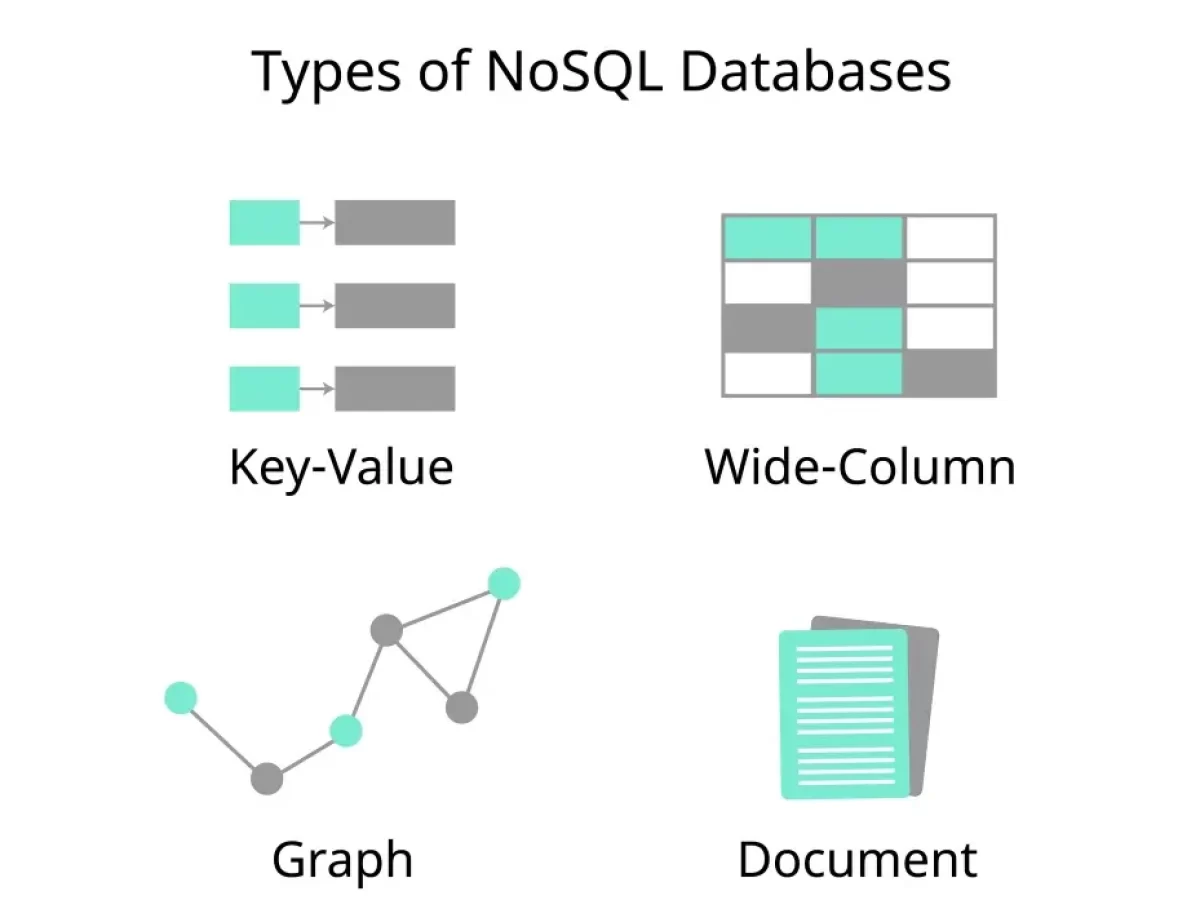

NoSQL (Not Only SQL) refers to a broad class of database management systems designed to handle large-scale, unstructured, or semi-structured data, prioritizing scalability, flexibility, and performance over strict relational consistency. Unlike SQL databases (RDBMS), NoSQL databases use non-relational data models and are optimized for specific use cases.
Key Characteristics:
- Schema Flexibility: No fixed schema; supports dynamic or schema-less data.
- Data Models: Includes key-value, document, column-family, and graph databases.
- Scalability: Horizontal scaling (adding servers) via distributed architectures.
- High Performance: Optimized for specific workloads (e.g., high read/write throughput).
- Eventual Consistency: Often prioritizes availability and partition tolerance (CAP theorem) over immediate consistency.
Types of NoSQL Databases:
- Key-Value: Redis, DynamoDB (simple key-value pairs).
- Document: MongoDB, CouchDB (JSON/BSON documents).
- Column-Family: Cassandra, HBase (wide-column stores).
- Graph: Neo4j, ArangoDB (relationships and nodes).
Use Case: Handling large-scale web applications, real-time analytics, or unstructured data like social media posts.
Support: MongoDB, Cassandra, Redis, Neo4j, etc.; no direct SQL equivalent, but some NoSQL databases support SQL-like queries (e.g., MongoDB's query language, Cassandra's CQL).
2. Can you give an example of a NoSQL database in action?
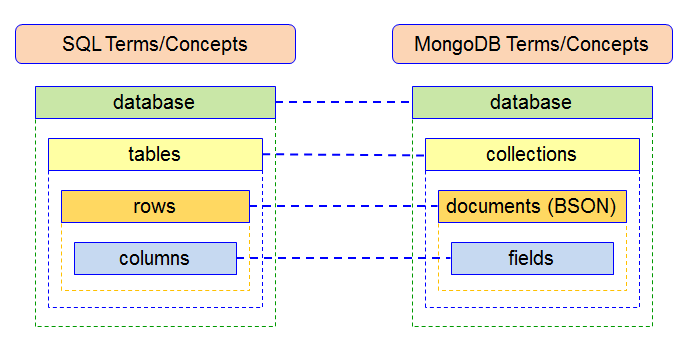
MongoDB Example (JavaScript with MongoDB Node.js driver):
const { MongoClient } = require('mongodb'); async function run() { const uri = "mongodb://localhost:27017"; const client = new MongoClient(uri); try { await client.connect(); const db = client.db('company_db'); const employees = db.collection('Employees'); // Insert documents await employees.insertMany([ { EmployeeID: 1, FirstName: 'John', Salary: 60000, Department: { ID: 1, Name: 'IT' } }, { EmployeeID: 2, FirstName: 'Jane', Salary: 55000, Department: { ID: 2, Name: 'HR' } }, { EmployeeID: 3, FirstName: 'kristal', Salary: 65000, Department: { ID: 1, Name: 'IT' } } ]); // Query documents const results = await employees.find({ Salary: { $gt: 55000 } }).toArray(); console.log(results); } finally { await client.close(); }
} run().catch(console.dir);
SQL Equivalent:
-- SQL equivalent
CREATE TABLE Employees ( EmployeeID INT PRIMARY KEY, FirstName VARCHAR(50), Salary DECIMAL(10, 2), DepartmentID INT
); CREATE TABLE Departments ( DepartmentID INT PRIMARY KEY, DepartmentName VARCHAR(50)
); INSERT INTO Employees (EmployeeID, FirstName, Salary, DepartmentID)
VALUES (1, 'John', 60000.00, 1), (2, 'Jane', 55000.00, 2), (3, 'kristal', 65000.00, 1); INSERT INTO Departments (DepartmentID, DepartmentName)
VALUES (1, 'IT'), (2, 'HR'); SELECT e.EmployeeID, e.FirstName, e.Salary, d.DepartmentName
FROM Employees e
JOIN Departments d ON e.DepartmentID = d.DepartmentID
WHERE e.Salary > 55000.00;
Output (MongoDB):
[ { EmployeeID: 1, FirstName: 'John', Salary: 60000, Department: { ID: 1, Name: 'IT' } }, { EmployeeID: 3, FirstName: 'kristal', Salary: 65000, Department: { ID: 1, Name: 'IT' } }
]
Output (SQL):
EmployeeID | FirstName | Salary | DepartmentName
-----------|-----------|----------|---------------
1 | John | 60000.00 | IT
3 | kristal | 65000.00 | IT
Note:
- MongoDB stores data as JSON-like documents, embedding department info in
Employees. - SQL uses normalized tables with a
JOINto combine data. - MongoDB's query uses
$gtfor "greater than"; SQL uses>.
3. What are the key differences between SQL and NoSQL databases?

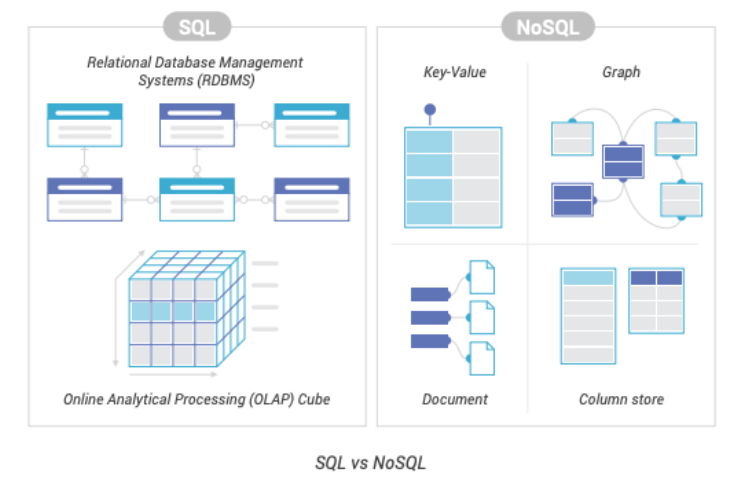
| Aspect | SQL (Relational) | NoSQL (Non-Relational) |
|---|---|---|
| Data Model | Structured, tabular (rows/columns) | Flexible (key-value, document, column, graph) |
| Schema | Fixed, defined before data insertion | Dynamic, schema-less or flexible |
| Scalability | Vertical (bigger servers) | Horizontal (more servers, distributed) |
| Consistency | Strong (ACID transactions) | Eventual (BASE: Basically Available, Soft state, Eventual consistency) |
| Query Language | SQL (standardized) | Varies (e.g., MongoDB's query language, CQL) |
| Joins | Common, using JOIN clauses | Rare, data often denormalized or embedded |
| Use Case | Structured data, complex queries, transactions | Unstructured/semi-structured data, scalability |
| Examples | MySQL, PostgreSQL, SQL Server, Oracle | MongoDB, Cassandra, Redis, Neo4j |
Example Use Cases:
- SQL: Financial systems (e.g., banking transactions requiring ACID compliance), ERP systems, structured reporting.
- NoSQL: Social media platforms (e.g., handling varied user data), real-time analytics, IoT data streams.
4. When should you use SQL vs. NoSQL?

The choice depends on data structure, scalability needs, consistency requirements, and application complexity. Below are guidelines and examples.
When to Use SQL:
- Structured Data: Data fits into predefined tables with fixed schemas (e.g., employee records, financial transactions).
- Complex Queries: Requires joins, aggregations, or subqueries (e.g., reporting across multiple tables).
- ACID Transactions: Needs strong consistency and reliability (e.g., banking, e-commerce order processing).
- Mature Ecosystem: Benefits from standardized SQL and robust tools (e.g., MySQL Workbench, SQL Server Management Studio).
Examples:
- A payroll system with fixed employee and salary tables.
- A relational database for inventory management with complex joins.
- A CRM system requiring consistent updates across related tables.
Example (SQL for a Transactional System):
-- Transaction for transferring salary between accounts
START TRANSACTION;
UPDATE Accounts SET Balance = Balance - 1000.00 WHERE AccountID = 1;
UPDATE Accounts SET Balance = Balance + 1000.00 WHERE AccountID = 2;
COMMIT;
Note: SQL ensures ACID compliance for reliable transfers.
When to Use NoSQL:
- Unstructured/Semi-Structured Data: Data varies in structure (e.g., user profiles with optional fields, JSON data).
- High Scalability: Needs to handle massive data volumes or traffic (e.g., social media, IoT).
- Rapid Development: Requires flexible schemas for frequent changes (e.g., startup prototypes).
- Specific Workloads: Optimized for key-value lookups, graph traversals, or wide-column queries.
Examples:
- A social media platform storing user posts with varying attributes.
- A real-time analytics system for clickstream data.
- A recommendation engine using graph relationships.
Example (NoSQL for Flexible Data):
const { MongoClient } = require('mongodb'); async function run() { const uri = "mongodb://localhost:27017"; const client = new MongoClient(uri); try { await client.connect(); const db = client.db('social_db'); const users = db.collection('Users'); // Insert users with varying attributes await users.insertMany([ { userId: 1, name: 'John', preferences: { theme: 'dark', notifications: true } }, { userId: 2, name: 'Jane', preferences: { language: 'en' } }, { userId: 3, name: 'kristal', age: 30 } ]); // Query users with preferences const results = await users.find({ 'preferences.theme': 'dark' }).toArray(); console.log(results); } finally { await client.close(); }
} run().catch(console.dir);
Output:
[{ userId: 1, name: 'John', preferences: { theme: 'dark', notifications: true } }] Note: MongoDB's schema-less design allows varied attributes without predefined structure.
Decision Criteria:
- Use SQL When: Data is structured and relational, complex transactions or joins are required, consistency is critical (e.g., financial systems).
- Example: A banking system with strict schema and transactional integrity.
- Use NoSQL When: Data is unstructured or semi-structured, high scalability or performance is needed (e.g., web-scale applications), rapid iteration or schema flexibility is required.
- Example: A content management system with diverse data types.
- Hybrid Approach: Use both (e.g., SQL for transactions, NoSQL for analytics) with data replication or polyglot persistence.
5. What are common mistakes when choosing SQL vs. NoSQL?
SQL:
- Over-normalizing data, causing complex joins and performance issues.
- Scaling vertically without considering distributed systems for large data.
- Ignoring NoSQL for workloads better suited to flexible schemas.
NoSQL:
- Choosing NoSQL for transactional systems requiring strong consistency.
- Neglecting data modeling, leading to inefficient queries (e.g., excessive scans in MongoDB).
- Underestimating maintenance complexity in distributed NoSQL systems.
General:
- Not analyzing data and workload requirements before choosing a database.
- Assuming one database fits all use cases in a project.
- Ignoring security (e.g., not using prepared statements in SQL, weak authentication in NoSQL).
6. What are best practices for choosing and using SQL vs. NoSQL?
Choosing SQL vs. NoSQL:
- Analyze data structure: Use SQL for structured data, NoSQL for unstructured/semi-structured.
- Evaluate scalability needs: SQL for moderate scale, NoSQL for massive horizontal scaling.
- Assess consistency requirements: SQL for ACID, NoSQL for eventual consistency.
- Consider query complexity: SQL for joins/aggregations, NoSQL for simple lookups or graphs.
SQL Best Practices:
- Normalize data appropriately, balancing performance and consistency.
- Use indexes and
EXPLAINto optimize queries (as discussed in performance tuning). - Implement transactions for data integrity (e.g.,
START TRANSACTION; COMMIT;). - Secure queries with prepared statements (as discussed in SQL injection prevention).
NoSQL Best Practices:
- Design data models for query patterns (e.g., denormalize in MongoDB for fast reads).
- Use appropriate NoSQL type (e.g., Redis for caching, Neo4j for relationships).
- Monitor and scale clusters (e.g., Cassandra replication, MongoDB sharding).
- Secure NoSQL databases with authentication and encryption (e.g., MongoDB roles).
General:
- Prototype with both SQL and NoSQL for critical use cases to compare performance.
- Use hybrid architectures when needed (e.g., SQL for transactions, NoSQL for analytics).
- Document data models and query patterns for maintainability.
- Test with realistic data volumes and workloads to validate choice.