SQL Replication & High Availability: Master-Slave, Clustering, Failover with MySQL & PostgreSQL Examples
Table of Contents
- 1. What is Replication and High Availability in SQL Databases?
- 2. What is Master-Slave Replication?
- 3. Example: Master-Slave Replication in MySQL
- 4. What is Clustering in SQL Databases?
- 5. Example: Clustering in PostgreSQL with Patroni
- 6. What is Failover in SQL Databases?
- 7. Example: Failover in MySQL Master-Slave
- 8. Comprehensive Example: Replication, Clustering, and Failover
- 9. Common Mistakes
- 10. Best Practices
1. What is replication and high availability in SQL databases?


Replication: The process of copying and maintaining database data across multiple servers to improve availability, scalability, and fault tolerance.
- Types: Master-Slave (one-way replication), Master-Master (bi-directional), etc.
- Purpose: Distributes load, provides redundancy, and supports failover.
High Availability (HA): Ensures a database remains accessible with minimal downtime, even during failures, using techniques like replication, clustering, and failover.
- Goal: Achieve near-zero downtime (e.g., 99.99% uptime) and automatic recovery.
- Components: Replication, clustering, load balancing, and failover mechanisms.
Use Case: Ensuring a banking database remains available during server crashes or scaling a web application's read-heavy workload.
Support: MySQL, PostgreSQL, SQL Server, Oracle; SQLite has limited HA support.
2. What is master-slave replication?
Master-slave replication is a one-way replication model where a master database handles all write operations (INSERT, UPDATE, DELETE), and one or more slave databases replicate the master's data for read operations.
Key Features:
- Asynchronous: Slaves periodically sync with the master (potential lag).
- Synchronous: Slaves sync in real-time (e.g., MySQL Group Replication).
- Read Scalability: Slaves handle read queries, reducing master load.
- Fault Tolerance: Slaves can be promoted to master during failover.
Use Case: Offloading reporting queries to slaves in an e-commerce system.
Challenges: Replication lag, data consistency, and failover management.
3. Can you give an example of setting up master-slave replication in MySQL?

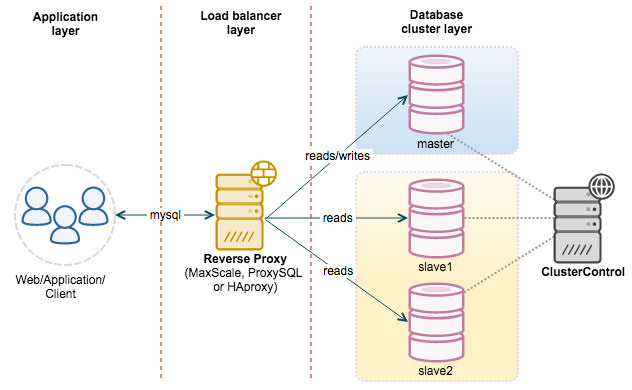
Below is an example of configuring master-slave replication in MySQL, including SQL commands and configuration file changes.
-- On Master (my.cnf or my.ini configuration)
-- [mysqld]
-- server-id = 1
-- log_bin = mysql-bin
-- binlog_do_db = company_db -- Restart master MySQL service after configuration -- Create replication user on master
CREATE USER 'repl_user'@'%' IDENTIFIED BY 'password123';
GRANT REPLICATION SLAVE ON *.* TO 'repl_user'@'%';
FLUSH PRIVILEGES; -- Get master status
SHOW MASTER STATUS;
-- Example output:
-- File: mysql-bin.000001, Position: 123, Binlog_Do_DB: company_db -- Create sample database and table
CREATE DATABASE company_db;
USE company_db;
CREATE TABLE Employees ( EmployeeID INT PRIMARY KEY, FirstName VARCHAR(50), Salary DECIMAL(10, 2), DepartmentID INT
); -- Insert sample data
INSERT INTO Employees (EmployeeID, FirstName, Salary, DepartmentID)
VALUES (1, 'John', 60000.00, 1), (2, 'Jane', 55000.00, 2); -- On Slave (my.cnf or my.ini configuration)
-- [mysqld]
-- server-id = 2
-- relay-log = mysql-relay-bin -- Restart slave MySQL service after configuration -- Configure slave to connect to master
CHANGE MASTER TO MASTER_HOST = 'master_ip_address', MASTER_USER = 'repl_user', MASTER_PASSWORD = 'password123', MASTER_LOG_FILE = 'mysql-bin.000001', MASTER_LOG_POS = 123; -- Start slave
START SLAVE; -- Check slave status
SHOW SLAVE STATUS\G
-- Look for: Slave_IO_Running: Yes, Slave_SQL_Running: Yes -- Query slave to verify replication
USE company_db;
SELECT * FROM Employees;
Output (Slave Query):
EmployeeID | FirstName | Salary | DepartmentID
-----------|-----------|----------|-------------
1 | John | 60000.00 | 1
2 | Jane | 55000.00 | 2
Note:
- Master Config: Enables binary logging (
log_bin) and sets a uniqueserver-id. - Slave Config: Sets a unique
server-idand relay log for replication events. - Replication User: Grants
REPLICATION SLAVEfor secure data transfer. - Verification:
SHOW SLAVE STATUSconfirms replication is running. - Integrates prior SQL concepts (
CREATE DATABASE,CREATE TABLE,INSERT,SELECT).
4. What is clustering in SQL databases?
Clustering involves grouping multiple database servers (nodes) to work together as a single system, providing high availability, load balancing, and scalability. Unlike master-slave replication, clustering often supports multiple writable nodes and automatic failover.
Types:
- Active-Passive: One primary node handles requests; others are on standby (e.g., SQL Server Always On Availability Groups).
- Active-Active: Multiple nodes handle read/write requests (e.g., MySQL Group Replication, PostgreSQL Citus).
Key Features:
- Load Balancing: Distributes queries across nodes.
- Fault Tolerance: Automatic failover to healthy nodes.
- Consistency: Varies (e.g., strong consistency in SQL Server, eventual in some NoSQL clusters).
Use Case: Ensuring continuous availability for a critical application.
Examples: MySQL Group Replication, PostgreSQL Patroni, SQL Server Always On.
5. Can you give an example of clustering in PostgreSQL with Patroni?
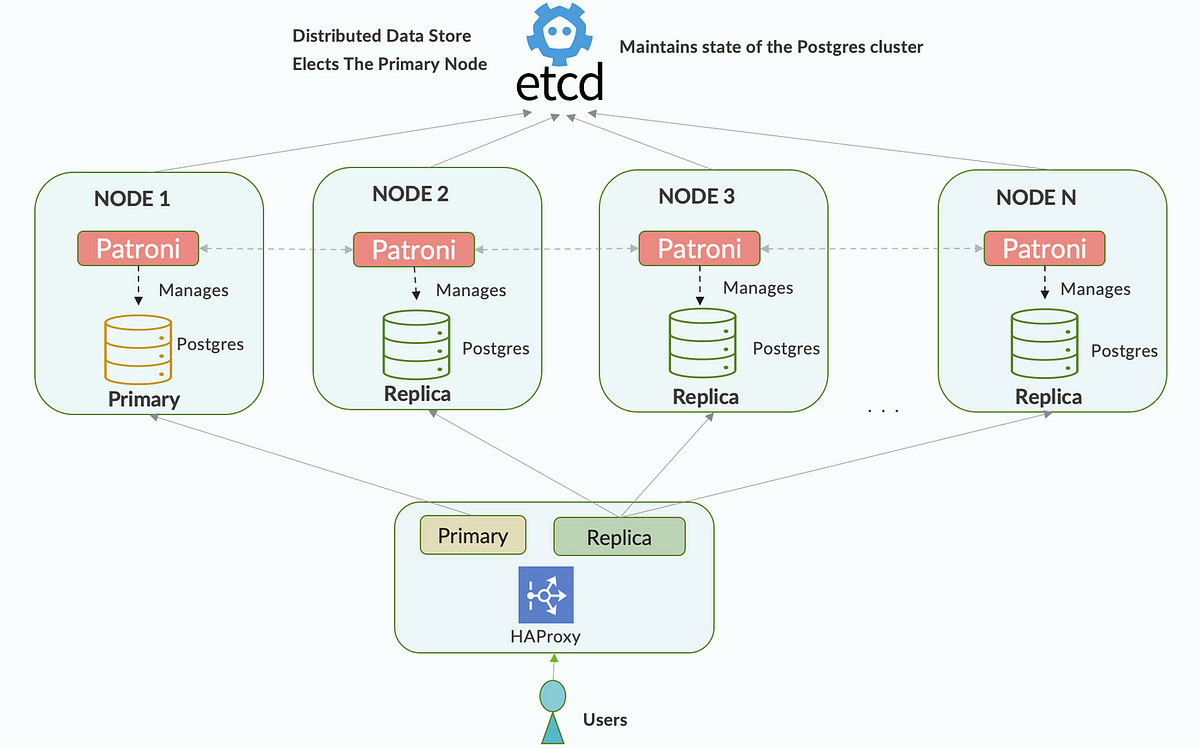
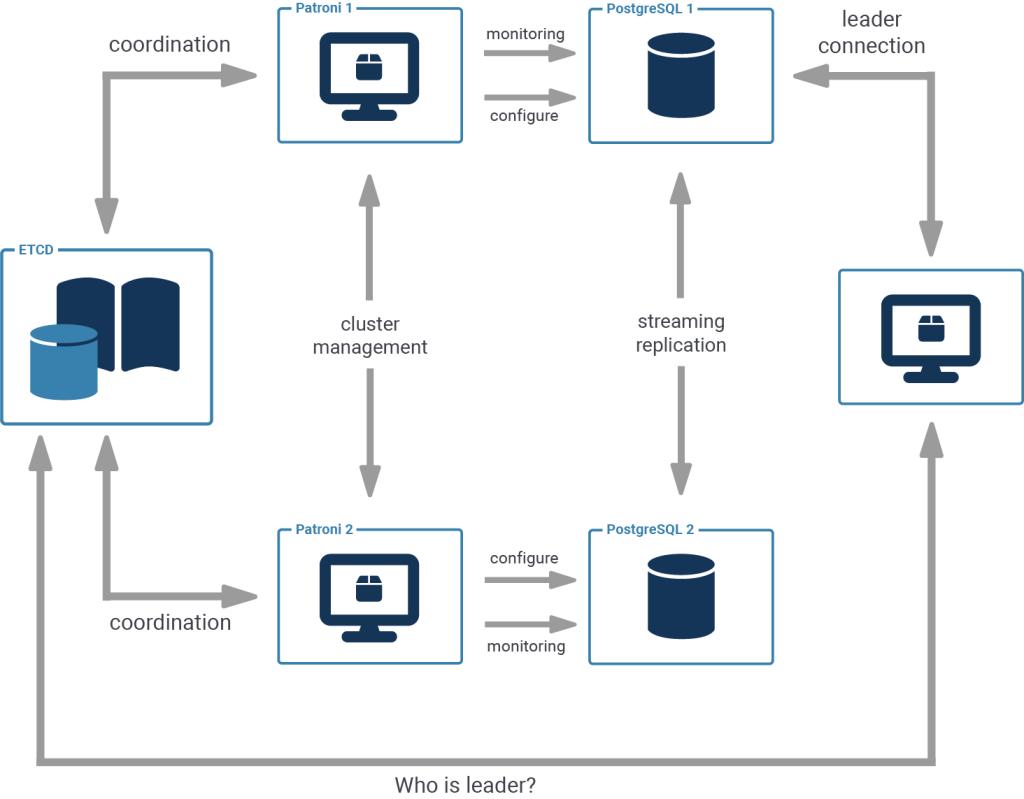
Patroni is a popular tool for PostgreSQL high-availability clustering, using a leader (primary) and replicas with automatic failover. Below is a simplified example of setting up a PostgreSQL cluster with Patroni, including SQL commands to verify.
-- Patroni configuration (example patroni.yml for one node)
-- scope: postgres_cluster
-- name: node1
-- restapi:
-- listen: 0.0.0.0:8008
-- postgresql:
-- listen: 0.0.0.0:5432
-- data_dir: /var/lib/postgresql/data
-- replication:
-- username: repl_user
-- password: password123
-- etcd:
-- host: 127.0.0.1:2379 -- Start Patroni on each node after configuration
-- patronictl -c patroni.yml start -- Connect to PostgreSQL leader (e.g., via psql)
CREATE DATABASE company_db;
\c company_db; -- Create table
CREATE TABLE Employees ( EmployeeID INT PRIMARY KEY, FirstName VARCHAR(50), Salary DECIMAL(10, 2), DepartmentID INT
); -- Insert data
INSERT INTO Employees (EmployeeID, FirstName, Salary, DepartmentID)
VALUES (1, 'John', 60000.00, 1), (2, 'Jane', 55000.00, 2); -- Query data on leader
SELECT * FROM Employees; -- Check cluster status (via Patroni)
-- patronictl -c patroni.yml list
-- Example output:
-- + Cluster: postgres_cluster (leader: node1, replica: node2) -- Simulate failover (stop leader node, Patroni promotes a replica)
-- patronictl -c patroni.yml failover -- Query replica (now leader) to verify data
SELECT * FROM Employees;
Output (Query on Leader/Replica):
EmployeeID | FirstName | Salary | DepartmentID
-----------|-----------|----------|-------------
1 | John | 60000.00 | 1
2 | Jane | 55000.00 | 2
Note:
- Patroni: Uses a distributed consensus system (e.g., etcd) for leader election and failover.
- Replication: Configures streaming replication for PostgreSQL replicas.
- Failover: Patroni automatically promotes a replica to leader during failure.
- Integrates prior SQL concepts (
CREATE DATABASE,CREATE TABLE,INSERT,SELECT).
6. What is failover in SQL databases?
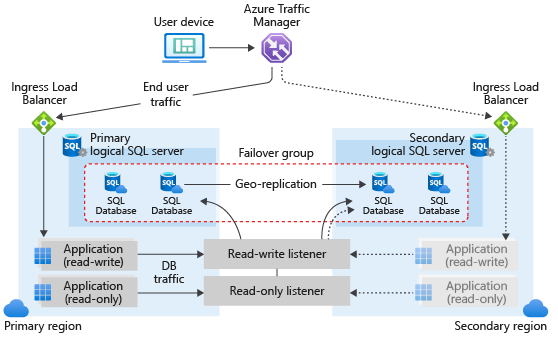
Failover is the process of automatically or manually switching to a standby database server (replica or node) when the primary server fails, ensuring continuous availability.
Types:
- Automatic Failover: Handled by clustering tools (e.g., Patroni, SQL Server Always On).
- Manual Failover: Administrator promotes a replica (e.g., MySQL master-slave).
Key Features:
- Detection: Monitors primary server health (e.g., heartbeat checks).
- Promotion: Elevates a replica to primary role.
- Redirection: Updates application connections to the new primary.
Use Case: Maintaining uptime during hardware failure or maintenance.
Challenges: Minimizing downtime, ensuring data consistency, and reconfiguring replicas.
7. Can you give an example of failover in MySQL master-slave replication?
Below is an example of manual failover in MySQL master-slave replication.
-- On Slave (before failover)
-- Check replication status
SHOW SLAVE STATUS\G
-- Ensure Slave_IO_Running: Yes, Slave_SQL_Running: Yes -- Simulate master failure (stop master service)
-- On slave, stop replication
STOP SLAVE; -- Promote slave to master
RESET SLAVE;
SET GLOBAL read_only = 0; -- Update configuration (my.cnf or my.ini)
-- [mysqld]
-- server-id = 1
-- log_bin = mysql-bin
-- read_only = 0 -- Restart slave (now master) MySQL service -- Create new replication user
CREATE USER 'repl_user'@'%' IDENTIFIED BY 'password123';
GRANT REPLICATION SLAVE ON *.* TO 'repl_user'@'%';
FLUSH PRIVILEGES; -- Verify data
USE company_db;
SELECT * FROM Employees; -- Configure new slave (former master or new server)
CHANGE MASTER TO MASTER_HOST = 'new_master_ip_address', MASTER_USER = 'repl_user', MASTER_PASSWORD = 'password123', MASTER_LOG_FILE = 'mysql-bin.000002', MASTER_LOG_POS = 456; -- Start replication on new slave
START SLAVE; -- Verify replication
SHOW SLAVE STATUS\G
Output (Employees Query):
EmployeeID | FirstName | Salary | DepartmentID
-----------|-----------|----------|-------------
1 | John | 60000.00 | 1
2 | Jane | 55000.00 | 2
Note:
- Manual Failover: Stops slave, promotes it to master, and reconfigures replication.
- Log Position: Obtained from
SHOW MASTER STATUSon the new master. - Read-Only: Disabled on the new master to allow writes.
- Integrates prior SQL concepts (
SELECT,GRANT).
8. Can you provide a comprehensive example of master-slave replication, clustering, and failover?
MySQL: Master-Slave Replication
-- Master configuration (my.cnf)
-- [mysqld]
-- server-id = 1
-- log_bin = mysql-bin
-- binlog_do_db = company_db -- Slave configuration (my.cnf)
-- [mysqld]
-- server-id = 2
-- relay-log = mysql-relay-bin
-- read_only = 1 -- On Master: Setup replication
CREATE DATABASE company_db;
USE company_db;
CREATE TABLE Employees ( EmployeeID INT PRIMARY KEY, FirstName VARCHAR(50), Salary DECIMAL(10, 2), DepartmentID INT
); INSERT INTO Employees (EmployeeID, FirstName, Salary, DepartmentID)
VALUES (1, 'John', 60000.00, 1), (2, 'Jane', 55000.00, 2); CREATE USER 'repl_user'@'%' IDENTIFIED BY 'password123';
GRANT REPLICATION SLAVE ON *.* TO 'repl_user'@'%';
FLUSH PRIVILEGES; SHOW MASTER STATUS;
-- Example: File: mysql-bin.000001, Position: 123 -- On Slave: Configure replication
CHANGE MASTER TO MASTER_HOST = 'master_ip_address', MASTER_USER = 'repl_user', MASTER_PASSWORD = 'password123', MASTER_LOG_FILE = 'mysql-bin.000001', MASTER_LOG_POS = 123;
START SLAVE; -- Verify replication
SHOW SLAVE STATUS\G
SELECT * FROM company_db.Employees; -- Simulate failover (on slave)
STOP SLAVE;
RESET SLAVE;
SET GLOBAL read_only = 0;
-- Update my.cnf to enable log_bin and restart
PostgreSQL: Patroni Clustering
-- Patroni configuration (patroni.yml for node1)
-- scope: postgres_cluster
-- name: node1
-- postgresql:
-- listen: 0.0.0.0:5432
-- data_dir: /var/lib/postgresql/data
-- replication:
-- username: repl_user
-- password: password123 -- Start Patroni on nodes
-- patronictl -c patroni.yml start -- On Leader: Create and populate data
CREATE DATABASE company_db;
\c company_db; CREATE TABLE Employees ( EmployeeID INT PRIMARY KEY, FirstName VARCHAR(50), Salary DECIMAL(10, 2), DepartmentID INT
); INSERT INTO Employees (EmployeeID, FirstName, Salary, DepartmentID)
VALUES (1, 'John', 60000.00, 1), (2, 'Jane', 55000.00, 2); SELECT * FROM Employees; -- Simulate failover
-- patronictl -c patroni.yml failover
-- Query new leader
SELECT * FROM Employees;
Output (MySQL and PostgreSQL Queries):
EmployeeID | FirstName | Salary | DepartmentID
-----------|-----------|----------|-------------
1 | John | 60000.00 | 1
2 | Jane | 55000.00 | 2
Description:
- MySQL Master-Slave: Sets up replication, verifies data, and performs manual failover.
- PostgreSQL Patroni: Configures a cluster with automatic failover, ensuring data availability.
- Integration: Both systems replicate
Employeestable data; failover ensures continuity. - Integrates prior SQL concepts (
CREATE DATABASE,CREATE TABLE,INSERT,SELECT,GRANT).
9. What are common mistakes in replication and high availability?
Master-Slave Replication:
- Not monitoring replication lag, causing inconsistent slave data.
- Incorrect binary log configuration, breaking replication.
- Failing to secure replication users (e.g., weak passwords).
Clustering:
- Not configuring consensus systems (e.g., etcd, ZooKeeper) properly, causing split-brain.
- Overloading cluster nodes, reducing performance.
- Ignoring network latency in distributed clusters.
Failover:
- Not testing failover procedures, leading to errors during real failures.
- Failing to redirect applications to the new primary, causing downtime.
- Not syncing replicas fully before failover, risking data loss.
General:
- Not backing up data (as discussed in data import/export), risking permanent loss.
- Ignoring performance tuning (e.g., indexing, as discussed in performance tuning).
- Not securing replication traffic (e.g., no SSL/TLS).
10. What are best practices for replication and high availability?

Master-Slave Replication:
- Monitor replication status (e.g., MySQL
SHOW SLAVE STATUS, PostgreSQLpg_stat_replication). - Use GTIDs (Global Transaction IDs) in MySQL for easier failover.
- Secure replication with SSL and least-privilege users (as discussed in security).
- Test failover scripts regularly to ensure reliability.
Clustering:
- Use tools like Patroni (PostgreSQL), Always On (SQL Server), or Group Replication (MySQL) for automated failover.
- Configure quorum-based consensus (e.g., etcd, ZooKeeper) for leader election.
- Balance load across nodes with read replicas or query routing.
Failover:
- Automate failover with tools like Patroni or Orchestrator (MySQL).
- Maintain synchronized replicas to minimize data loss.
- Update application connection strings dynamically (e.g., via proxy like ProxySQL).
General:
- Combine with backups (as discussed in data import/export) for disaster recovery.
- Optimize performance with indexes and query plans (as discussed in performance tuning).
- Secure data with encryption and role-based access (as discussed in security).
- Monitor HA setup with tools (e.g., Zabbix, Prometheus) for alerts on failures.
- Test HA configurations with realistic workloads and failure scenarios.